

Your graphics add a nice touch to my presentations and I recently used them for one of my all-hands meetings. Your toolbox adds professionalism to my slides. Instead of using standard clipart.
Claude Jones, Director of Engineer, @Walmartlabs, USA

Your graphics add a nice touch to my presentations and I recently used them for one of my all-hands meetings. Your toolbox adds professionalism to my slides. Instead of using standard clipart.
Claude Jones, Director of Engineer, @Walmartlabs, USA
I needed a fresh look at some of my slides. I've tried to find a way to create a paintbrush effect, to underline, accentuate, add some color and the handwritten markers were just the things. Very easy to use, easy to size, change the color. It was an affordable, perfect solution and I'm happy to recommend it.
Anonymous, US
The crisp, clean look of the graphics, and the fact that it allowed me to easily edit and change the colors to match the template was my main reason for purchasing them.
Brandie Jenkins, E-learning Developer, USA
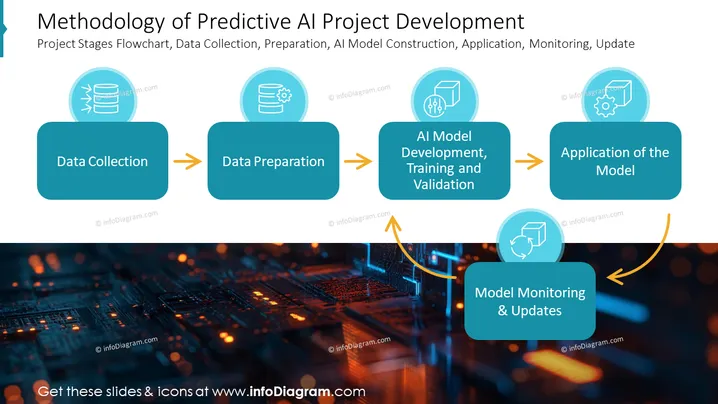
The slide outlines the methodology for developing predictive AI projects in a flowchart format, presenting four key stages: "Data Collection," which implies gathering relevant information; "Data Preparation," involving cleaning and organizing the data; "AI Model Development, Training and Validation," which entails building the model and ensuring it performs accurately; and "Application of the Model," where the AI solution is deployed. Additionally, "Model Monitoring & Updates" is shown as an iterative process indicating the need for ongoing refinement and improvement of the AI model after deployment.
The slide presents a sleek, professional look with its high-tech imagery and harmonious color scheme. The visual elements are organized in a clear, linear flow to depict the process steps straightforwardly.



