
Reviews
Ihre Grafiken verleihen meinen Präsentationen eine nette Note, und ich habe sie kürzlich für eines meiner All-Hands-Meetings verwendet. Ihre Toolbox verleiht meinen Folien Professionalität, anstatt Standard-Clipart zu verwenden.
Ich brauchte einen neuen Blick auf einige meiner Folien. Ich habe versucht, einen Weg zu finden, einen Pinselschlag-Effekt zu erzielen, um zu unterstreichen, hervorzuheben, Farbe hinzuzufügen, und die handgeschriebenen Markierungen waren genau das Richtige. Sehr einfach zu bedienen, leicht in der Größe zu ändern, die Farbe zu ändern. Es war eine erschwingliche, perfekte Lösung und ich empfehle sie gerne weiter.
Die klare, saubere Optik der Grafiken und die Tatsache, dass ich die Farben leicht bearbeiten und an die Vorlage anpassen konnte, war mein Hauptgrund für den Kauf.
Description
Meeting Follow-up: 4 Steps Flowchart
Slide Content:
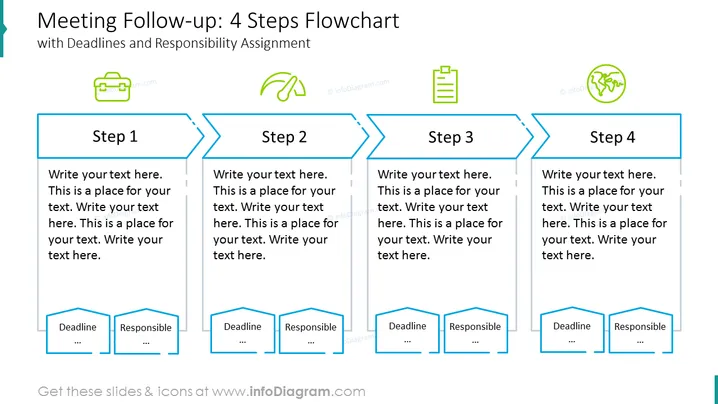
The slide represents a process flowchart titled "Meeting Follow-up: 4 Steps Flowchart with Deadlines and Responsibility Assignment". It illustrates a 4-step sequence for post-meeting action items. Each step includes space for a description, with additional placeholders for "Deadline" and "Responsible", facilitating the assignment of tasks and timelines. This structured approach emphasizes accountability and time management in meeting follow-ups.
Graphical Look:
- The slide background is white with a blue accent on the left border.
- The title is at the top in dark grey, with the subtitle in a lighter shade of grey.
- Four rectangular shapes with notched right corners represent the steps, outlined in blue with a darker blue fill.
- Arrows with a light blue border connect the steps, indicating process flow.
- Each step has a text placeholder in black with light grey bullet points.
- Two smaller rectangles with a darker blue border and fill labeled "Deadline" and "Responsible" are underneath each step.
- Icons depicting a briefcase, a leaf embraced by two curved arrows, a checklist, and the Earth with leaves are placed near each step's title, respectively.
- The overall color scheme is blue and grey with green icons, creating a professional and eco-themed aesthetic.
The slide has a clean and corporate design with clearly delineated sections for easy information input and comprehension. The use of arrows and the progression from left to right effectively communicate a workflow or a sequence of actions.
Use Cases:
- To outline the action plan and responsibilities derived from a business meeting.
- For project management presentations to showcase phase-by-phase execution.
- In training sessions to guide participants through a multi-step process.
- During team briefings to visually represent task delegation and deadlines.
How to Edit
How to edit text & colors

How to expand / shorten diagram

How to Replace Icons in infoDiagram PPT


