
Reviews
Ihre Grafiken verleihen meinen Präsentationen eine nette Note, und ich habe sie kürzlich für eines meiner All-Hands-Meetings verwendet. Ihre Toolbox verleiht meinen Folien Professionalität, anstatt Standard-Clipart zu verwenden.
Ich brauchte einen neuen Blick auf einige meiner Folien. Ich habe versucht, einen Weg zu finden, einen Pinselschlag-Effekt zu erzielen, um zu unterstreichen, hervorzuheben, Farbe hinzuzufügen, und die handgeschriebenen Markierungen waren genau das Richtige. Sehr einfach zu bedienen, leicht in der Größe zu ändern, die Farbe zu ändern. Es war eine erschwingliche, perfekte Lösung und ich empfehle sie gerne weiter.
Die klare, saubere Optik der Grafiken und die Tatsache, dass ich die Farben leicht bearbeiten und an die Vorlage anpassen konnte, war mein Hauptgrund für den Kauf.
Description
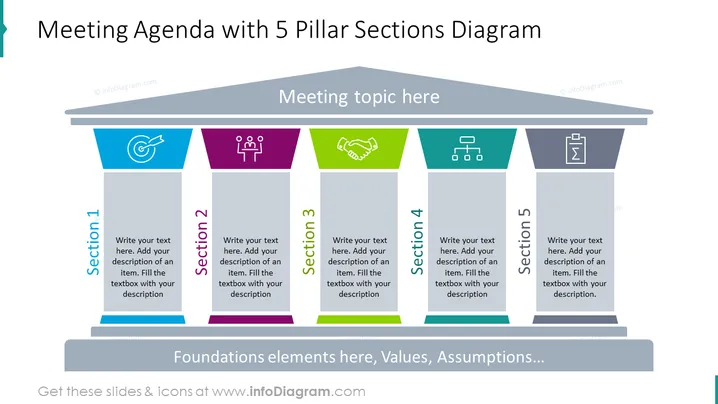
Meeting Agenda with 5 Pillar Sections Diagram
Slide Content
The slide titled 'Meeting Agenda with 5 Pillar Sections Diagram' presents a structured layout ideal for outlining the main topics of a meeting agenda. Each of the five sections is represented by a different color (blue, purple, green, teal, and gray), with accompanying icons that symbolize content that can be discussed in that segment. The slide suggests adding descriptions beneath each heading to articulate the specifics of the discussion points, thereby providing a clear visual representation of the meeting's structure.
Graphical Look
- The slide features a dark background with light text for contrast.
- A horizontal beam across the top segregates the slide title from the content area.
- Dominating the slide are five vertical pillars, each with a unique color: blue, purple, green, teal, and gray.
- Icons are placed at the top of each pillar, each correlating to typical business or meeting themes.
- Placeholder text prompts fill each pillar, suggesting the addition of detailed descriptions for each section.
The slide is professionally designed with a harmonious color palette and balance, using icons and colors to distinctively divide sections, making it easy to follow and visually engaging.
Use Cases
- To outline the distinct items on the agenda during a team meeting or a project update session.
- As a visual aid in strategic planning workshops, categorizing different strategic pillars.
- Within a conference setting to highlight key themes or sessions to attendees.
- For educational purposes, such as university or corporate training, to break down the components of a lesson or module.
How to Edit
How to edit text & colors

How to expand / shorten diagram

How to Replace Icons in infoDiagram PPT


