
Reviews
Sus gráficos añaden un toque agradable a mis presentaciones y recientemente los usé para una de mis reuniones generales. Su conjunto de herramientas añade profesionalismo a mis diapositivas. En lugar de usar imágenes prediseñadas estándar.
Necesitaba un aspecto fresco para algunas de mis diapositivas. Había intentado encontrar una forma de crear un efecto de pincel, de subrayar, acentuar, añadir algo de color y los marcadores escritos a mano fueron justo lo que necesitaba. Muy fácil de usar, fácil de ajustar el tamaño, cambiar el color. Fue una solución asequible y perfecta, y estoy feliz de recomendarla.
El aspecto nítido y limpio de los gráficos, y el hecho de que me permitiera editar y cambiar fácilmente los colores para que coincidieran con la plantilla fue mi principal razón para comprarlos.
Description
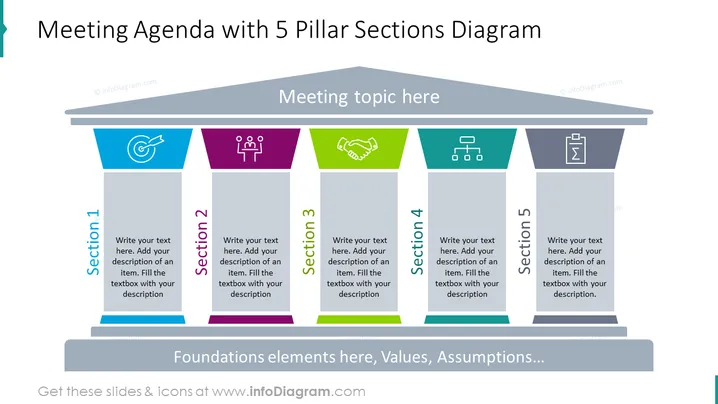
Meeting Agenda with 5 Pillar Sections Diagram
Slide Content
The slide titled 'Meeting Agenda with 5 Pillar Sections Diagram' presents a structured layout ideal for outlining the main topics of a meeting agenda. Each of the five sections is represented by a different color (blue, purple, green, teal, and gray), with accompanying icons that symbolize content that can be discussed in that segment. The slide suggests adding descriptions beneath each heading to articulate the specifics of the discussion points, thereby providing a clear visual representation of the meeting's structure.
Graphical Look
- The slide features a dark background with light text for contrast.
- A horizontal beam across the top segregates the slide title from the content area.
- Dominating the slide are five vertical pillars, each with a unique color: blue, purple, green, teal, and gray.
- Icons are placed at the top of each pillar, each correlating to typical business or meeting themes.
- Placeholder text prompts fill each pillar, suggesting the addition of detailed descriptions for each section.
The slide is professionally designed with a harmonious color palette and balance, using icons and colors to distinctively divide sections, making it easy to follow and visually engaging.
Use Cases
- To outline the distinct items on the agenda during a team meeting or a project update session.
- As a visual aid in strategic planning workshops, categorizing different strategic pillars.
- Within a conference setting to highlight key themes or sessions to attendees.
- For educational purposes, such as university or corporate training, to break down the components of a lesson or module.
How to Edit
How to edit text & colors

How to expand / shorten diagram

How to Replace Icons in infoDiagram PPT


