
Reviews
Your graphics add a nice touch to my presentations and I recently used them for one of my all-hands meetings. Your toolbox adds professionalism to my slides. Instead of using standard clipart.
I needed a fresh look at some of my slides. I've tried to find a way to create a paintbrush effect, to underline, accentuate, add some color and the handwritten markers were just the things. Very easy to use, easy to size, change the color. It was an affordable, perfect solution and I'm happy to recommend it.
The crisp, clean look of the graphics, and the fact that it allowed me to easily edit and change the colors to match the template was my main reason for purchasing them.
Description
May (US)
Slide Content
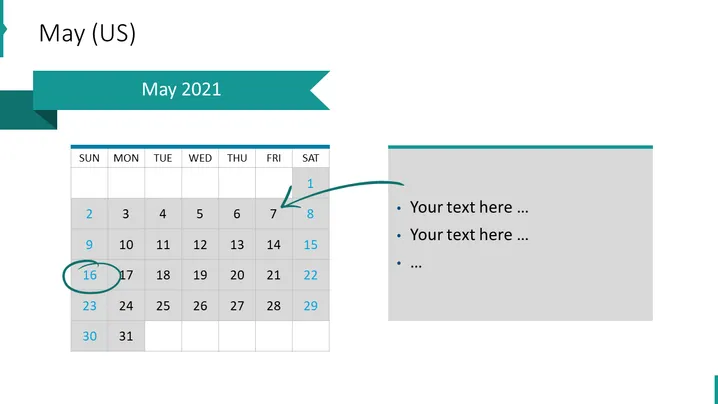
The slide appears to be a visual representation of May 2021 from a calendar perspective with a focus on particular dates that may be important or have events associated with them, indicated by arrows and highlights. The slide also includes a section for text where details about those dates or events can be expanded upon. Items such as "Your text here ..." serve as placeholders for custom content related to the calendar.
Graphical Look
- The slide background is white.
- The title "May 2021" is placed inside a teal, right-aligned banner.
- A monthly calendar for May (US version, starting on Sunday) is displayed on the left, with a light gray grid and dark gray text for dates.
- Specific dates on the calendar are emphasized; one with a teal circle (16), and another with an arrow pointing to it (1).
- On the right side, there is a text box with a bullet list (indicated by teal circles) for adding notes. It is bordered at the top with a teal line matching the banner's color.
- The text placeholders are in dark gray, using ellipsis to suggest more text can be added.
The overall look of the slide is minimalistic and modern, with a clean layout that uses teal as an accent color to bring attention to key elements. The division of the slide between the calendar and text box uses space efficiently and creates an organized appearance.
Use Cases
- To outline key dates in a project timeline during a business presentation.
- To highlight important company events or deadlines in a monthly overview.
- To review past activities or future plans with team members or stakeholders.
- For personal planning or scheduling presentations, demonstrating how certain dates correlate with events or tasks.
How to Edit
How to edit text & colors

How to expand / shorten diagram

How to Replace Icons in infoDiagram PPT


