

Your graphics add a nice touch to my presentations and I recently used them for one of my all-hands meetings. Your toolbox adds professionalism to my slides. Instead of using standard clipart.
Claude Jones, Director of Engineer, @Walmartlabs, USA

Your graphics add a nice touch to my presentations and I recently used them for one of my all-hands meetings. Your toolbox adds professionalism to my slides. Instead of using standard clipart.
Claude Jones, Director of Engineer, @Walmartlabs, USA
I needed a fresh look at some of my slides. I've tried to find a way to create a paintbrush effect, to underline, accentuate, add some color and the handwritten markers were just the things. Very easy to use, easy to size, change the color. It was an affordable, perfect solution and I'm happy to recommend it.
Anonymous, US
The crisp, clean look of the graphics, and the fact that it allowed me to easily edit and change the colors to match the template was my main reason for purchasing them.
Brandie Jenkins, E-learning Developer, USA
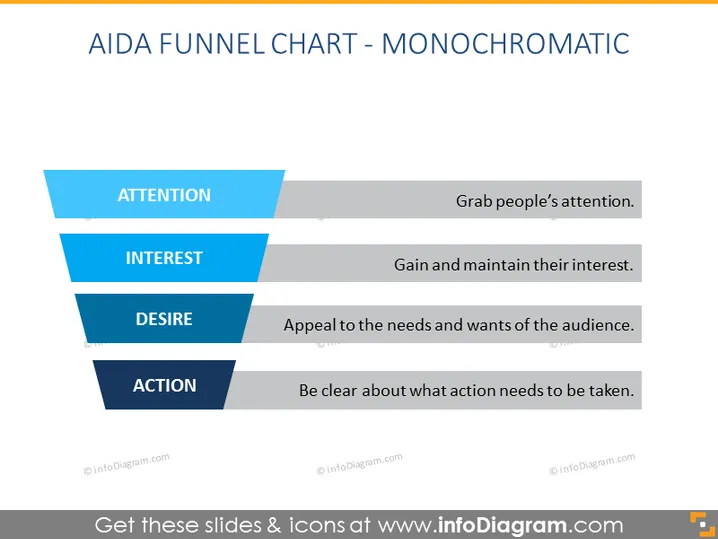
The slide illustrates the AIDA Funnel Chart in monochromatic tones, representing a marketing model that guides the customer journey from awareness to action. Each stage includes a short explanation: ATTENTION - Grab people’s attention, which means capturing the target audience's interest. INTEREST - Gain and maintain their interest, which involves engaging the audience. DESIRE - Appeal to the needs and wants of the audience, which entails creating an emotional connection. ACTION - Be clear about what action needs to be taken, guiding the audience towards a specific behavior or decision.
The slide has a clear, professional presentation style, adhering to a monochromatic color palette that emphasizes the funnel concept. Its minimalist design ensures attention is focused on the content and stages of the AIDA model.



