

Your graphics add a nice touch to my presentations and I recently used them for one of my all-hands meetings. Your toolbox adds professionalism to my slides. Instead of using standard clipart.
Claude Jones, Director of Engineer, @Walmartlabs, USA

Your graphics add a nice touch to my presentations and I recently used them for one of my all-hands meetings. Your toolbox adds professionalism to my slides. Instead of using standard clipart.
Claude Jones, Director of Engineer, @Walmartlabs, USA
I needed a fresh look at some of my slides. I've tried to find a way to create a paintbrush effect, to underline, accentuate, add some color and the handwritten markers were just the things. Very easy to use, easy to size, change the color. It was an affordable, perfect solution and I'm happy to recommend it.
Anonymous, US
The crisp, clean look of the graphics, and the fact that it allowed me to easily edit and change the colors to match the template was my main reason for purchasing them.
Brandie Jenkins, E-learning Developer, USA
##Slide content:
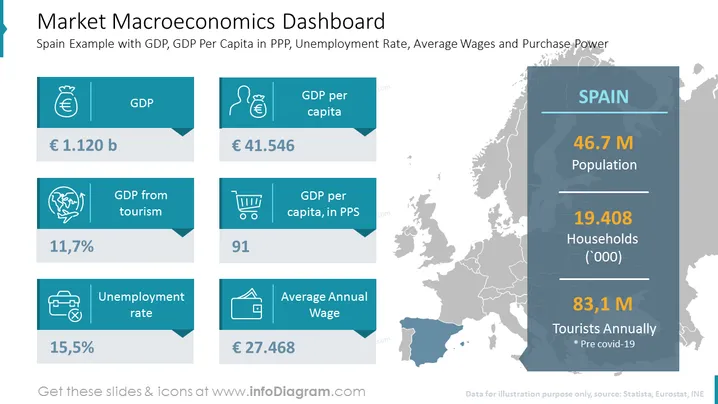
This macroeconomic dashboard PPT slide shows us the Spanish market potential. On the right-hand side, we have the total population, the number of households, and annual tourist visits. On the left side, we have statistics for the gross domestic product (GDP), GDP per capita, tourism, purchasing power, unemployment rate, and average annual wage. All of these economic indicators form the market's power. which shows you whether some market is worth entering. The template is completely editable, without any quality loss of the elements, so you can adjust it according to your needs, and present another market this way. This presentation will show your analytical skills and will instill confidence in the potential investors or stakeholders engaged with this project. All our templates are compatible with other formats such as Google Slides and Keynote. Click on the slide to see the whole deck for a winning go-to-market strategy.
##Slide infographic description:
Map Vector, Text Block, Colorful Banners, Straight Line Vectors, Money Bag Icon, Man with a Money Bag Icon, Shopping Cart Trolley Icon, International Tourism Icon, Unemployment Icon, Wallet Icon



