
Reviews
Ihre Grafiken verleihen meinen Präsentationen eine nette Note, und ich habe sie kürzlich für eines meiner All-Hands-Meetings verwendet. Ihre Toolbox verleiht meinen Folien Professionalität, anstatt Standard-Clipart zu verwenden.
Ich brauchte einen neuen Blick auf einige meiner Folien. Ich habe versucht, einen Weg zu finden, einen Pinselschlag-Effekt zu erzielen, um zu unterstreichen, hervorzuheben, Farbe hinzuzufügen, und die handgeschriebenen Markierungen waren genau das Richtige. Sehr einfach zu bedienen, leicht in der Größe zu ändern, die Farbe zu ändern. Es war eine erschwingliche, perfekte Lösung und ich empfehle sie gerne weiter.
Die klare, saubere Optik der Grafiken und die Tatsache, dass ich die Farben leicht bearbeiten und an die Vorlage anpassen konnte, war mein Hauptgrund für den Kauf.
Description
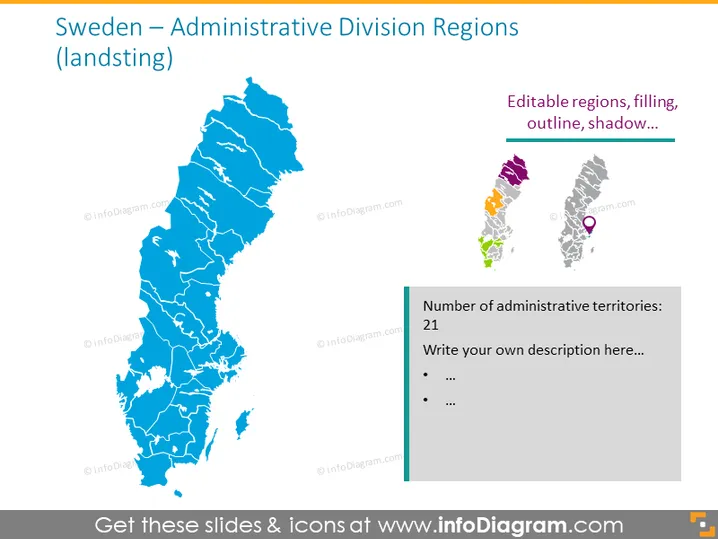
Sweden – Administrative Division Regions (landsting)
Slide Content
The slide is focused on the administrative division of Sweden, particularly its landsting or regions. It features a large map of Sweden divided into its various regions, each delineated clearly to show the boundaries. To the right, there's a smaller panel that emphasizes the editable nature of the region's graphics, mentioning customization options like filling, outline, and shadow. Below this, a text box indicates Sweden's division into 21 administrative territories and encourages the viewer to add a custom description.
Graphical Look
- Central focus on a large, blue map of Sweden displaying administrative boundaries
- Contrasting sidebar with different region colors showcasing editability
- Feature callouts on the sidebar with lines pointing to specific regions on map for emphasis
- Text box with a heading in bold, followed by two bullet points for additional information
- Simplified, stylized icons are placed beside the editable regions, symbolizing customization options
- A harmonious blend of a central image with supporting sidebar content for clear communication
The slide presents a crisp and professional look with distinct coloring and clean lines for easy understanding and visualization. The complementary text and icons provide context and instructions for customization.
Use Cases
- Presenting regional statistics or data analysis for Sweden in a business meeting.
- Discussing regional market penetration or sales figures in a marketing strategy presentation.
- Displaying geographical distribution of resources, branches, or operations in a corporate presentation.
- Educational purposes to demonstrate the geographical political divisions within Sweden.
How to Edit
How to edit text & colors

How to expand / shorten diagram

How to Replace Icons in infoDiagram PPT


