
Reviews
Sus gráficos añaden un toque agradable a mis presentaciones y recientemente los usé para una de mis reuniones generales. Su conjunto de herramientas añade profesionalismo a mis diapositivas. En lugar de usar imágenes prediseñadas estándar.
Necesitaba un aspecto fresco para algunas de mis diapositivas. Había intentado encontrar una forma de crear un efecto de pincel, de subrayar, acentuar, añadir algo de color y los marcadores escritos a mano fueron justo lo que necesitaba. Muy fácil de usar, fácil de ajustar el tamaño, cambiar el color. Fue una solución asequible y perfecta, y estoy feliz de recomendarla.
El aspecto nítido y limpio de los gráficos, y el hecho de que me permitiera editar y cambiar fácilmente los colores para que coincidieran con la plantilla fue mi principal razón para comprarlos.
Description
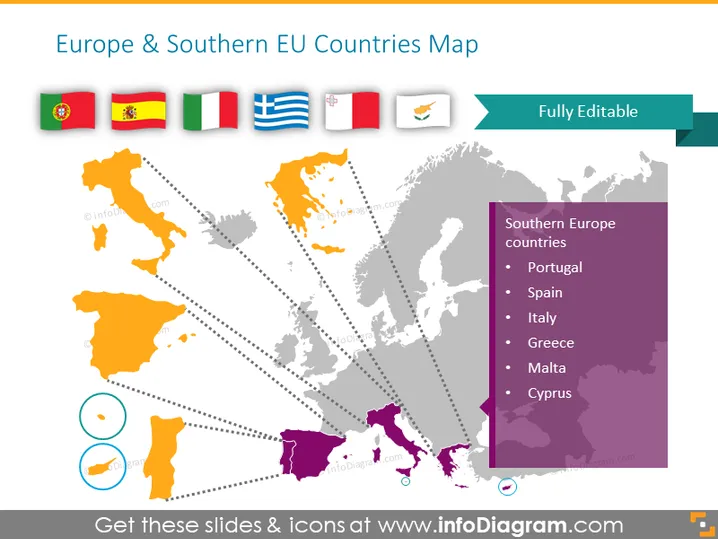
Europe & Southern EU Countries Map
Slide Content
The PowerPoint slide is titled "Europe & Southern EU Countries Map". It visually displays a map focused on Europe, with specific highlighting on the Southern European countries: Portugal, Spain, Italy, Greece, Malta, and Cyprus. Each country is further represented by its national flag, placed beside the map. The list provides a clear reference guide, linking the geographical location to its flag, indicating these countries' inclusion in the presentation focus.
Graphical Look
- The slide features a central vector graphic of a stylized map of Europe.
- Southern European countries are highlighted in orange and purple on the map.
- Dotted lines connect the highlighted countries to their respective flags positioned above the map.
- A set of six national flags of the Southern EU countries is neatly aligned horizontally above the map.
- The title of the slide is in a large, bold font, with a complementary colored tab stating "Fully Editable."
- On the right side, there is a purple rectangular box with a list of countries under the header "Southern Europe countries".
- At the bottom left corner, there is a circular icon with two smaller circular elements to its left, symbolizing customization or data points (unclear without context).
The overall look of the slide is professional, with a clean design that uses colors and spatial alignment to create a visual connection between geographic regions and their flags. The map is the central focus, with supplemental text and graphical elements enhancing the viewer's understanding of the material.
Use Cases
- Presenting demographic or economic data specific to Southern EU countries in a business or academic setting.
- Introducing topics related to European geography or politics, particularly discussions around the European Union.
- Using the map as an educational tool to teach the geography of the region.
- Customizing the slide for tourism or cultural presentations to highlight destinations within Southern Europe.
How to Edit
How to edit text & colors

How to expand / shorten diagram

How to Replace Icons in infoDiagram PPT


