

Your graphics add a nice touch to my presentations and I recently used them for one of my all-hands meetings. Your toolbox adds professionalism to my slides. Instead of using standard clipart.
Claude Jones, Director of Engineer, @Walmartlabs, USA

Your graphics add a nice touch to my presentations and I recently used them for one of my all-hands meetings. Your toolbox adds professionalism to my slides. Instead of using standard clipart.
Claude Jones, Director of Engineer, @Walmartlabs, USA
I needed a fresh look at some of my slides. I've tried to find a way to create a paintbrush effect, to underline, accentuate, add some color and the handwritten markers were just the things. Very easy to use, easy to size, change the color. It was an affordable, perfect solution and I'm happy to recommend it.
Anonymous, US
The crisp, clean look of the graphics, and the fact that it allowed me to easily edit and change the colors to match the template was my main reason for purchasing them.
Brandie Jenkins, E-learning Developer, USA
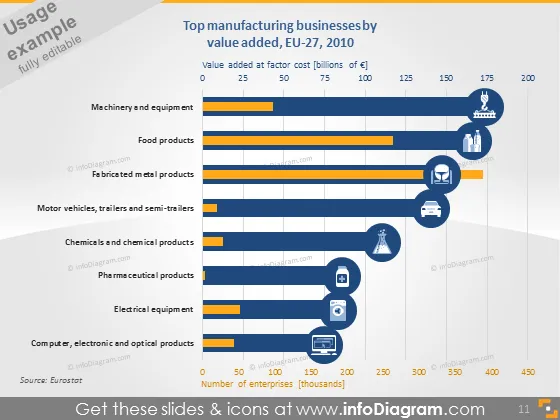
The slide presents a comparative analysis of the top manufacturing sectors within the EU-27 for the year 2010, based on two key metrics: value added at factor cost and number of enterprises in thousands. The industries listed are Machinery and Equipment, Food Products, Fabricated Metal Products, Motor Vehicles, Trailers and Semi-trailers, Chemicals and Chemical Products, Pharmaceutical Products, Electrical Equipment, Computer, Electronic and Optical Products. Value-added indicates the sector's economic input, while the number of enterprises reflects sector size and scale.
The slide has a professional and clear structure with contrasting colors for visual distinction between the different data sets. The use of industry-related icons provides a quick visual reference to the sectors being compared.



