

Your graphics add a nice touch to my presentations and I recently used them for one of my all-hands meetings. Your toolbox adds professionalism to my slides. Instead of using standard clipart.
Claude Jones, Director of Engineer, @Walmartlabs, USA

Your graphics add a nice touch to my presentations and I recently used them for one of my all-hands meetings. Your toolbox adds professionalism to my slides. Instead of using standard clipart.
Claude Jones, Director of Engineer, @Walmartlabs, USA
I needed a fresh look at some of my slides. I've tried to find a way to create a paintbrush effect, to underline, accentuate, add some color and the handwritten markers were just the things. Very easy to use, easy to size, change the color. It was an affordable, perfect solution and I'm happy to recommend it.
Anonymous, US
The crisp, clean look of the graphics, and the fact that it allowed me to easily edit and change the colors to match the template was my main reason for purchasing them.
Brandie Jenkins, E-learning Developer, USA
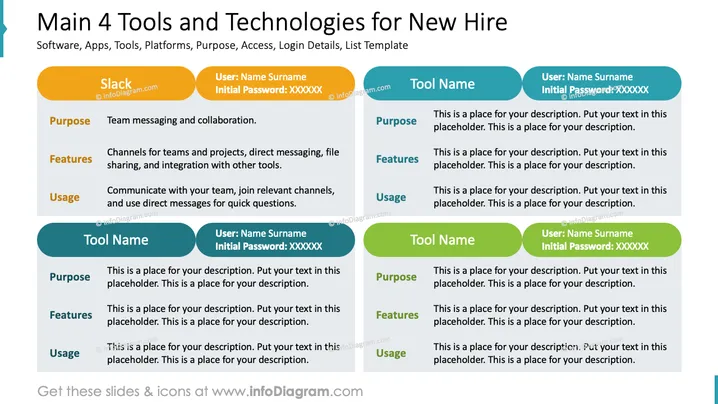
The PowerPoint slide titled "Main 4 Tools and Technologies for New Hire" appears to be a template showcasing various software, apps, or technologies that a new employee might be expected to use. It outlines the purpose, features, and usage of each tool. One example provided is for the collaboration software "Slack," with details including team messaging, channels for teams and projects, direct messaging, file sharing, and integration with other tools. The usage tip suggests communicating with the team, joining channels, and using direct messages for quick questions. There are placeholders for three additional tools, with sections to include their purposes, features, and usage, alongside login details.
The overall look of the slide is clean and modern, with a visually coherent layout that guides viewers through each item systematically. The color distinction and use of simple forms make the slide appear well-organized and easy to read.



