
Reviews
Sus gráficos añaden un toque agradable a mis presentaciones y recientemente los usé para una de mis reuniones generales. Su conjunto de herramientas añade profesionalismo a mis diapositivas. En lugar de usar imágenes prediseñadas estándar.
Necesitaba un aspecto fresco para algunas de mis diapositivas. Había intentado encontrar una forma de crear un efecto de pincel, de subrayar, acentuar, añadir algo de color y los marcadores escritos a mano fueron justo lo que necesitaba. Muy fácil de usar, fácil de ajustar el tamaño, cambiar el color. Fue una solución asequible y perfecta, y estoy feliz de recomendarla.
El aspecto nítido y limpio de los gráficos, y el hecho de que me permitiera editar y cambiar fácilmente los colores para que coincidieran con la plantilla fue mi principal razón para comprarlos.
Description
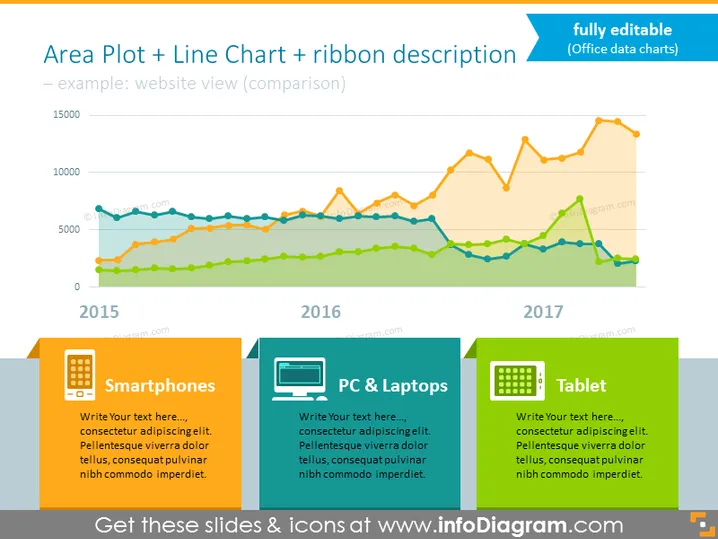
Area Plot + Line Chart + ribbon description
Slide Content
The PowerPoint slide presents a comparison of website views over three years using an "Area Plot + Line Chart" with a "ribbon description". The years displayed are 2015, 2016, and 2017. Three distinct colored lines and areas indicate the data trends over these years, suggesting the presence of multiple data sets or metrics, potentially comparing different devices such as smartphones, PCs & laptops, and tablets.
Graphical Look
- A title at the top of the slide in bold, with a subtitle in smaller font size.
- The main graphic is an area plot overlaid with a line chart, each with different colors.
- A horizontal x-axis indicating years 2015, 2016, and 2017, with corresponding data points.
- A vertical y-axis with numerical values ranging from 0 to 15,000, measuring website views.
- Three descriptive boxes at the bottom with icons representing smartphones, PCs & laptops, and tablets.
- Each descriptive box has space for text and is marked with a vibrant color that matches one of the lines in the chart.
- The slide background is plain with a slight gradient transitioning from top to bottom.
The slide features a clean and colorful design with clearly demarked areas for explanatory text and data visualization. The vibrant colors make the statistical data appealing and easy to distinguish.
Use Cases
- To compare website traffic across multiple platforms or devices.
- Showcasing trends in user behavior over several years in a business report or marketing presentation.
- Illustrating comparative analysis in a sales meeting to discuss the effectiveness of different digital marketing strategies.
- Used in a quarterly or annual review to highlight progress and identify areas for growth or concern.
How to Edit
How to edit text & colors

How to expand / shorten diagram

How to Replace Icons in infoDiagram PPT


