
Reviews
Ihre Grafiken verleihen meinen Präsentationen eine nette Note, und ich habe sie kürzlich für eines meiner All-Hands-Meetings verwendet. Ihre Toolbox verleiht meinen Folien Professionalität, anstatt Standard-Clipart zu verwenden.
Ich brauchte einen neuen Blick auf einige meiner Folien. Ich habe versucht, einen Weg zu finden, einen Pinselschlag-Effekt zu erzielen, um zu unterstreichen, hervorzuheben, Farbe hinzuzufügen, und die handgeschriebenen Markierungen waren genau das Richtige. Sehr einfach zu bedienen, leicht in der Größe zu ändern, die Farbe zu ändern. Es war eine erschwingliche, perfekte Lösung und ich empfehle sie gerne weiter.
Die klare, saubere Optik der Grafiken und die Tatsache, dass ich die Farben leicht bearbeiten und an die Vorlage anpassen konnte, war mein Hauptgrund für den Kauf.
Description
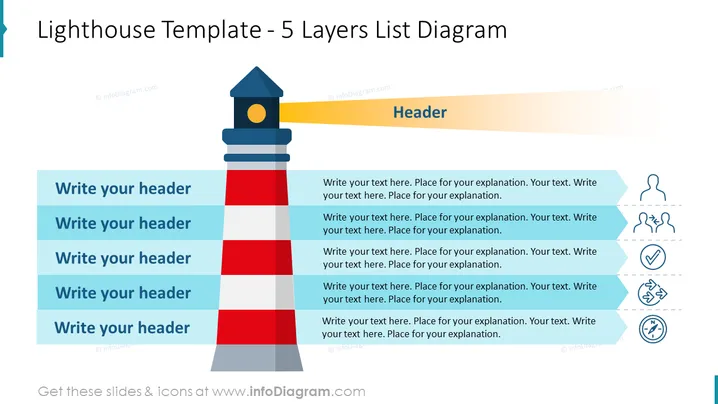
Lighthouse Template - 5 Layers List Diagram
Slide Content
The slide titled "Lighthouse Template - 5 Layers List Diagram" seems to be a visual tool for presenting a layered approach to a topic. Each layer corresponds to a list item with space for a header and accompanying explanatory text. Concepts such as guidance, monitoring, and structure are implied through the use of the lighthouse metaphor. The five layers could represent stages, levels of priority, or a hierarchical structure within a strategic plan or project. Additionally, to the right of each header, there is room for further description, denoting the capacity for more detailed explanations.
Graphical Look
- The title of the slide is prominently displayed in a large, dark blue font at the top.
- To the left stands a graphical representation of a lighthouse, with alternating bands of red, grey, and blue.
- A golden yellow light extends from the lighthouse's top section.
- Adjacent to the lighthouse, on the right side, are five text boxes, each with a blue header and grey text area beneath.
- Each text box has an associated icon to its right, depicting abstract concepts like teamwork, ideas, confirmation, strategy, and direction.
- The icons feature a minimalist line art style with some elements filled to create a sense of depth and highlight certain parts (like the bulb in the idea icon).
The slide has a modern and professional appearance with a clean layout employing flat design principles for its graphical elements. Its color palette of blue, grey, red, and yellow is visually striking yet consistent throughout.
Use Cases
- Illustrating a company's strategic priorities or values with each layer representing a different aspect.
- Outlining the phases in a project timeline where each phase requires specific attention.
- Presenting a hierarchy of needs or services to give a clear overview of organizational structure or process layers.
- Describing a step-by-step guide where each layer signifies a distinct action or requirement critical for the overall objective.
How to Edit
How to edit text & colors

How to expand / shorten diagram

How to Replace Icons in infoDiagram PPT


