
Reviews
Ihre Grafiken verleihen meinen Präsentationen eine nette Note, und ich habe sie kürzlich für eines meiner All-Hands-Meetings verwendet. Ihre Toolbox verleiht meinen Folien Professionalität, anstatt Standard-Clipart zu verwenden.
Ich brauchte einen neuen Blick auf einige meiner Folien. Ich habe versucht, einen Weg zu finden, einen Pinselschlag-Effekt zu erzielen, um zu unterstreichen, hervorzuheben, Farbe hinzuzufügen, und die handgeschriebenen Markierungen waren genau das Richtige. Sehr einfach zu bedienen, leicht in der Größe zu ändern, die Farbe zu ändern. Es war eine erschwingliche, perfekte Lösung und ich empfehle sie gerne weiter.
Die klare, saubere Optik der Grafiken und die Tatsache, dass ich die Farben leicht bearbeiten und an die Vorlage anpassen konnte, war mein Hauptgrund für den Kauf.
Description
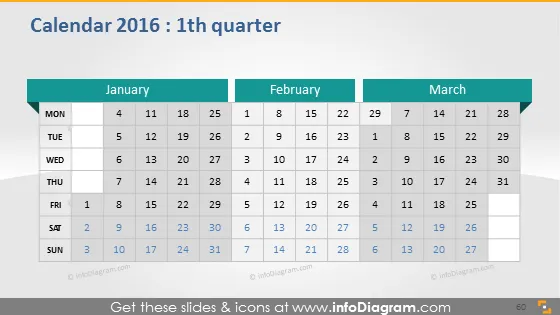
Calendar 2016: 1th quarter
Slide Content
The PowerPoint slide is titled "Calendar 2016: 1th quarter" and it features a three-month view showcasing January, February, and March of 2016. Each month is represented in its own column, with days aligned horizontally by weeks, and each day has a corresponding date number. The calendar focuses on weekdays with an emphasis on Mondays for planning and organization purposes, suggesting it's designed for a professional or business context where the working week is central to scheduling and planning activities.
Graphical Look
- The slide background is a gradient of dark grey fading to a lighter shade towards the bottom.
- Three distinct columns represent the months of January, February, and March, each with a header in teal color.
- Days of the week are labeled at the top of each column in black text on a light grey background.
- Dates are presented in simple black text, organized in a grid pattern corresponding to the days of the week.
- The current week is highlighted with a lighter grey background across all three months, indicating its significance.
- There is a subtle shadow effect under the month blocks, giving a slight 3D impression.
The overall look of the slide is professional and clean, with a clear emphasis on the calendar layout. The use of color is minimal but effectively highlights the different sections and the current week.
Use Cases
- Planning project timelines and milestones for a specific quarter.
- Highlighting important dates or deadlines in a business meeting or presentation.
- Distributing at the beginning of a quarter for team members to mark their vacations and business trips.
- As a visual aid in budgeting or forecasting meetings to align financial plans with the calendar dates.
How to Edit
How to edit text & colors

How to expand / shorten diagram

How to Replace Icons in infoDiagram PPT


