

Your graphics add a nice touch to my presentations and I recently used them for one of my all-hands meetings. Your toolbox adds professionalism to my slides. Instead of using standard clipart.
Claude Jones, Director of Engineer, @Walmartlabs, USA

Your graphics add a nice touch to my presentations and I recently used them for one of my all-hands meetings. Your toolbox adds professionalism to my slides. Instead of using standard clipart.
Claude Jones, Director of Engineer, @Walmartlabs, USA
I needed a fresh look at some of my slides. I've tried to find a way to create a paintbrush effect, to underline, accentuate, add some color and the handwritten markers were just the things. Very easy to use, easy to size, change the color. It was an affordable, perfect solution and I'm happy to recommend it.
Anonymous, US
The crisp, clean look of the graphics, and the fact that it allowed me to easily edit and change the colors to match the template was my main reason for purchasing them.
Brandie Jenkins, E-learning Developer, USA
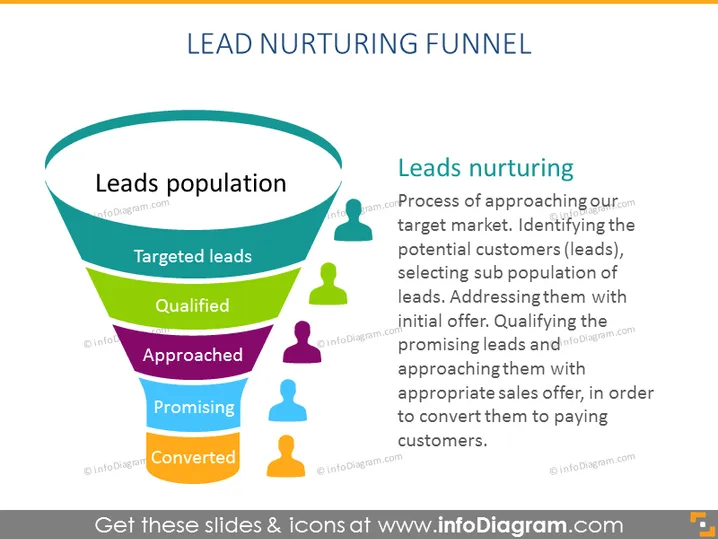
The slide introduces the concept of a "Lead Nurturing Funnel," starting with the "Leads population," which represents the entire market of potential leads. It narrows down to "Targeted leads," where the potential customers are identified. "Qualified" leads are those deemed to be possibly interested in the offer. "Approached" leads are the subset that have been directly introduced to the service or product. "Promising" leads are those who show interest, and finally, "Converted" ones become paying customers. The "Leads nurturing" text explains this as a process of approaching the target market, filtering leads, and progressively qualifying them to secure sales.
The slide has a clean, professional look with a clear color-coded visual representation of each stage in the lead nurturing process. The use of human-shaped icons adds a relatable touch to the otherwise abstract concept of lead nurturing.



