
Reviews
Sus gráficos añaden un toque agradable a mis presentaciones y recientemente los usé para una de mis reuniones generales. Su conjunto de herramientas añade profesionalismo a mis diapositivas. En lugar de usar imágenes prediseñadas estándar.
Necesitaba un aspecto fresco para algunas de mis diapositivas. Había intentado encontrar una forma de crear un efecto de pincel, de subrayar, acentuar, añadir algo de color y los marcadores escritos a mano fueron justo lo que necesitaba. Muy fácil de usar, fácil de ajustar el tamaño, cambiar el color. Fue una solución asequible y perfecta, y estoy feliz de recomendarla.
El aspecto nítido y limpio de los gráficos, y el hecho de que me permitiera editar y cambiar fácilmente los colores para que coincidieran con la plantilla fue mi principal razón para comprarlos.
Description
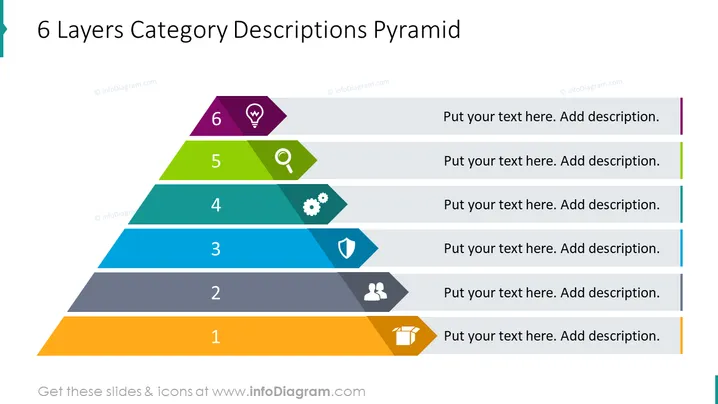
6 Layers Category Descriptions Pyramid
Slide Content
The slide depicts a "6 Layers Category Descriptions Pyramid," which is organized to represent a hierarchy or a progression of categories. Each layer of the pyramid, labeled from 1 to 6, is associated with a different colored segment and includes an icon and a space for custom text. The structure implies that category 1 is the foundation, and each subsequent category builds upon the previous one, with category 6 being at the top of the pyramid. This pyramid can be used to describe a process, a set of principles, or layered concepts where each level is a prerequisite for the next.
Graphical Look
- The slide features a pyramid divided into six colored layers, each representing a different level.
- On the left, each layer is numbered from 1 at the bottom to 6 at the top.
- Every layer includes a distinct icon that represents a concept or function pertinent to that level.
- Level 1, orange, displays an open box icon.
- Level 2, dark grey, shows a user group icon.
- Level 3, blue, features a shield icon.
- Level 4, light blue, sports a gear icon.
- Level 5, green, contains a magnifying glass icon.
- Level 6, purple, presents a light bulb idea icon.
- To the right of each icon and label, there is a text placeholder with the instruction "Put your text here. Add description."
- The overall design employs a clean, modern aesthetic with a flat graphic style and a complementary color palette.
The slide has a professional and straightforward appearance, enabling clear communication of multi-level concepts. The use of vibrant colors and icons capture attention and facilitate identification of the different layers.
Use Cases
- To demonstrate a business model or strategy layered in multiple steps, from foundational to advanced.
- For illustrating organizational structure, with the base level including general staff and ascending up to executive leadership.
- In training or educational presentations to outline the progression of skill levels or competencies.
- When summarizing complex project phases or milestones in a visually hierarchical manner.
How to Edit
How to edit text & colors

How to expand / shorten diagram

How to Replace Icons in infoDiagram PPT


