
Reviews
Vos graphiques ajoutent une belle touche à mes présentations et je les ai récemment utilisés pour l'une de mes réunions générales. Votre boîte à outils ajoute du professionnalisme à mes diapositives. Au lieu d'utiliser des cliparts standards.
J'avais besoin d'un nouveau regard sur certaines de mes diapositives. J'ai essayé de trouver un moyen de créer un effet de pinceau, de souligner, d'accentuer, d'ajouter de la couleur et les marqueurs manuscrits étaient exactement ce qu'il fallait. Très facile à utiliser, facile à ajuster la taille, à changer la couleur. C'était une solution abordable et parfaite et je suis heureux de la recommander.
L'aspect net et épuré des graphiques, et le fait qu'il m'ait permis d'éditer et de changer facilement les couleurs pour les adapter au modèle, ont été les principales raisons de mon achat.
Description
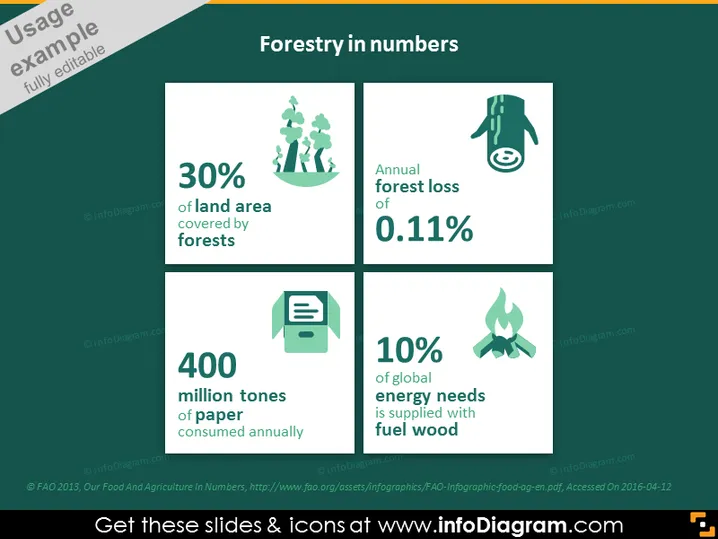
Forestry in numbers
Slide Content
The slide presents key statistics around forestry with a focus on conservation and usage. It states that 30% of land area is covered by forests, indicating a measure of global forestry extent. It mentions an annual forest loss of 0.11%, highlighting concerns about deforestation rates. The statistic of 400 million tonnes of paper consumed annually suggests high paper use and potential environmental impact. Lastly, it points out that 10% of global energy needs are supplied with fuel wood, emphasizing the reliance on forests for energy.
Graphical Look
- Four equal-sized square panels with rounded corners are arranged in a 2x2 grid.
- Each panel has a distinct icon at the top: the first shows trees, the second a hand stopping water, the third a printer, and the fourth a flame.
- The icons are in white against dark green backgrounds, creating contrast.
- Below each icon, key statistics are presented in large white font, making them stand out against the subtler green.
- The background of the slide is a lighter shade of green, providing a thematic consistency with the subject.
- A darker green banner runs along the top with the slide title in white text.
- There is consistent use of green shades, evoking the theme of forestry.
The overall look of the slide is clean and modern, with a strong thematic color scheme that aligns with the topic of forestry. The use of icons and text makes for an easy-to-follow presentation of data.
Use Cases
- Presenting environmental data in a corporate social responsibility (CSR) report.
- Providing an overview of forestry statistics in an educational or academic presentation.
- Outlining key facts for a policy discussion on environmental conservation.
- Highlighting industry-specific data in a forestry or paper production business meeting.
How to Edit
How to edit text & colors

How to expand / shorten diagram

How to Replace Icons in infoDiagram PPT


