

Your graphics add a nice touch to my presentations and I recently used them for one of my all-hands meetings. Your toolbox adds professionalism to my slides. Instead of using standard clipart.
Claude Jones, Director of Engineer, @Walmartlabs, USA

Your graphics add a nice touch to my presentations and I recently used them for one of my all-hands meetings. Your toolbox adds professionalism to my slides. Instead of using standard clipart.
Claude Jones, Director of Engineer, @Walmartlabs, USA
I needed a fresh look at some of my slides. I've tried to find a way to create a paintbrush effect, to underline, accentuate, add some color and the handwritten markers were just the things. Very easy to use, easy to size, change the color. It was an affordable, perfect solution and I'm happy to recommend it.
Anonymous, US
The crisp, clean look of the graphics, and the fact that it allowed me to easily edit and change the colors to match the template was my main reason for purchasing them.
Brandie Jenkins, E-learning Developer, USA
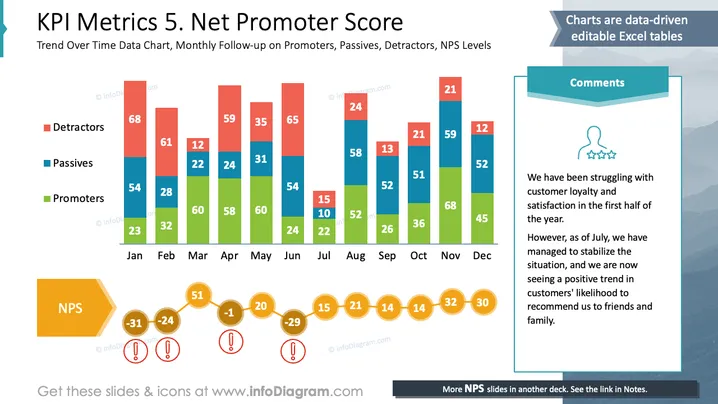
This slide illustrates a Net Promoter Score (NPS) analysis over a year. It displays monthly trends for three customer groups: Detractors criticize the service, impacting NPS negatively. Passives are indifferent, having little effect on NPS. Promoters recommend the service, boosting NPS. Comments note an initially low customer satisfaction which improves from July onward as shown by increased Promoters and decreased Detractors.
Overall, the slide effectively combines data visualization with narrative elements. The chart colors contrast well, making different data categories easily distinguishable.



