
Reviews
Your graphics add a nice touch to my presentations and I recently used them for one of my all-hands meetings. Your toolbox adds professionalism to my slides. Instead of using standard clipart.
I needed a fresh look at some of my slides. I've tried to find a way to create a paintbrush effect, to underline, accentuate, add some color and the handwritten markers were just the things. Very easy to use, easy to size, change the color. It was an affordable, perfect solution and I'm happy to recommend it.
The crisp, clean look of the graphics, and the fact that it allowed me to easily edit and change the colors to match the template was my main reason for purchasing them.
Description
Key Components of Capital Expenditure Evaluation
Slide Content
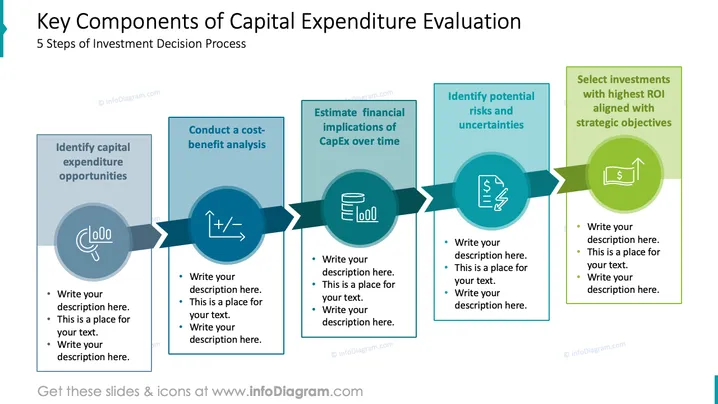
The PowerPoint slide outlines the "5 Steps of Investment Decision Process" for evaluating capital expenditures. It includes identifying capital expenditure opportunities, which involves recognizing potential projects or assets worth investing in. Conducting cost-benefit analysis means assessing expected returns against the costs involved. Estimating financial implications of CapEx over time refers to projecting the long-term financial impact. Identifying potential risks and uncertainties means recognizing factors that could impact the investment's success. Selecting investments with the highest ROI aligned with strategic objectives emphasizes choosing projects that offer the best financial return and support business goals.
Graphical Look
- The slide has a clear, professional design with a teal and blue color scheme.
- Five rectangular boxes serve as headers for each step, with the corresponding step title.
- Each box has an adjacent circle with an icon representing that step's concept.
- The circles are interconnected through a horizontal arrow, suggesting progression from one step to another.
- Each step's details are provided in text boxes below the headers and icons, with placeholder text.
- The slide's title is placed at the top in a large, bold font for emphasis.
This PowerPoint slide features a well-structured and visually harmonious design with consistent use of icons and colors to represent the investment decision process. The icons are metaphorical and help in visually distinguishing each of the five steps.
Use Cases
- To present investment strategy processes during financial planning meetings.
- During shareholder briefings to explain the methodology behind capital allocation.
- For training sessions in finance departments on how to evaluate potential investments.
- As part of a business proposal to show the steps taken to ensure a project's financial viability.
How to Edit
How to edit text & colors

How to expand / shorten diagram

How to Replace Icons in infoDiagram PPT


