
Reviews
Ihre Grafiken verleihen meinen Präsentationen eine nette Note, und ich habe sie kürzlich für eines meiner All-Hands-Meetings verwendet. Ihre Toolbox verleiht meinen Folien Professionalität, anstatt Standard-Clipart zu verwenden.
Ich brauchte einen neuen Blick auf einige meiner Folien. Ich habe versucht, einen Weg zu finden, einen Pinselschlag-Effekt zu erzielen, um zu unterstreichen, hervorzuheben, Farbe hinzuzufügen, und die handgeschriebenen Markierungen waren genau das Richtige. Sehr einfach zu bedienen, leicht in der Größe zu ändern, die Farbe zu ändern. Es war eine erschwingliche, perfekte Lösung und ich empfehle sie gerne weiter.
Die klare, saubere Optik der Grafiken und die Tatsache, dass ich die Farben leicht bearbeiten und an die Vorlage anpassen konnte, war mein Hauptgrund für den Kauf.
Description
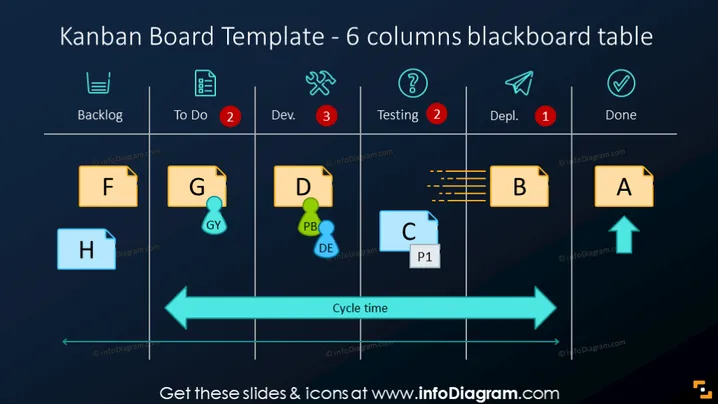
Kanban Board Template - 6 columns blackboard table
Slide Content
The slide depicts a Kanban Board Template comprising 6 columns that signify different stages of a workflow: Backlog, To Do, Development (Dev.), Testing, Deployment (Depl.), and Done. These columns are visual representations of a task's progress from being a backlog item to its completion. Items F, H, G, D, C, B, and A are placeholders for tasks distributed across stages, with some tasks marked with icons or numbers indicating priority or additional information, such as issues or comments. A blue arrow labeled "Cycle time" emphasizes the flow and duration of tasks from start to finish.
Graphical Look
- The background of the slide resembles a blackboard, with a dark textured appearance.
- Six titled columns span horizontally across the slide, each separated by white gridlines and paired with an icon at the top.
- Rectangular sticky notes with capital letters and additional symbology represent tasks in various stages—colored in yellow and blue to stand out against the background.
- Red circular badges with numbers signify important notes or quantities related to specific columns.
- A bright blue horizontal arrow stretches across the bottom, giving a visual cue for the timeline or sequence of the tasks.
- Icons representing different stages include a list icon for Backlog, tools for To Do, a wrench for Development, a question mark for Testing, a paper plane for Deployment, and a checkmark for Done.
The slide has a clear and organized appearance, with contrasting colors that effectively distinguish task cards and status indicators. The use of familiar icons aids in quickly identifying the purpose of each column.
Use Cases
- To present the current status of various tasks or projects during a team meeting or project status update.
- To visualize and discuss the workflow in a process improvement workshop, identifying bottlenecks and areas of efficiency.
- For project managers to demonstrate the progression of work to stakeholders in a clear and accessible manner. You did not include an image with your request. Please provide the image you would like me to analyze.
How to Edit
How to edit text & colors

How to expand / shorten diagram

How to Replace Icons in infoDiagram PPT


