
Reviews
Ihre Grafiken verleihen meinen Präsentationen eine nette Note, und ich habe sie kürzlich für eines meiner All-Hands-Meetings verwendet. Ihre Toolbox verleiht meinen Folien Professionalität, anstatt Standard-Clipart zu verwenden.
Ich brauchte einen neuen Blick auf einige meiner Folien. Ich habe versucht, einen Weg zu finden, einen Pinselschlag-Effekt zu erzielen, um zu unterstreichen, hervorzuheben, Farbe hinzuzufügen, und die handgeschriebenen Markierungen waren genau das Richtige. Sehr einfach zu bedienen, leicht in der Größe zu ändern, die Farbe zu ändern. Es war eine erschwingliche, perfekte Lösung und ich empfehle sie gerne weiter.
Die klare, saubere Optik der Grafiken und die Tatsache, dass ich die Farben leicht bearbeiten und an die Vorlage anpassen konnte, war mein Hauptgrund für den Kauf.
Description
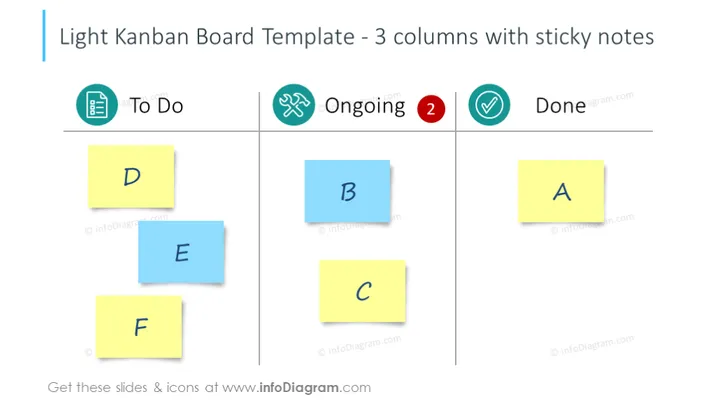
Light Kanban Board Template - 3 columns with sticky notes
Slide Content
The PowerPoint slide titled "Light Kanban Board Template - 3 columns with sticky notes" represents a simplified Kanban board. The slide is split into three distinct sections indicative of workflow stages: To Do, Ongoing, and Done. Each section is marked by a corresponding icon: a list for "To Do," a looping arrow for "Ongoing," and a checkmark for "Done." Within these columns are colored sticky notes labeled "D," "E," and "F" under "To Do," "B" and "C" in "Ongoing," and "A" in "Done," symbolizing tasks at various stages of completion.
Graphical Look
- The slide background is plain white providing a clean, uncluttered backdrop for content.
- Three primary columns are delineated with light gray vertical lines, creating a structured flow.
- Each column is headed with a colorful icon encircled in a rounded square; blue for "To Do," green with a red number two for "Ongoing," and teal for "Done."
- Six sticky notes in yellow and blue shades are scattered across the columns, each with a single capitalized letter from "A" to "F."
- The sticky notes cast a subtle shadow, giving a slight 3D effect that suggests they are attached to the slide surface.
- The text uses a bold, sans-serif font for easy readability.
The overall look of the slide is modern and minimalist, with a focus on a visual representation of task management. The use of contrasting colors and simple icons makes the information easy to digest at a glance.
Use Cases
- To visually organize and present project tasks during a team meeting or workshop.
- To facilitate a sprint planning session in agile project management, helping to identify work distribution.
- To update stakeholders on project progress in a status report or review meeting.
- For personal time management or planning during a personal review or preparation for upcoming tasks or deadlines.
How to Edit
How to edit text & colors

How to expand / shorten diagram

How to Replace Icons in infoDiagram PPT


