
Reviews
Your graphics add a nice touch to my presentations and I recently used them for one of my all-hands meetings. Your toolbox adds professionalism to my slides. Instead of using standard clipart.
I needed a fresh look at some of my slides. I've tried to find a way to create a paintbrush effect, to underline, accentuate, add some color and the handwritten markers were just the things. Very easy to use, easy to size, change the color. It was an affordable, perfect solution and I'm happy to recommend it.
The crisp, clean look of the graphics, and the fact that it allowed me to easily edit and change the colors to match the template was my main reason for purchasing them.
Description
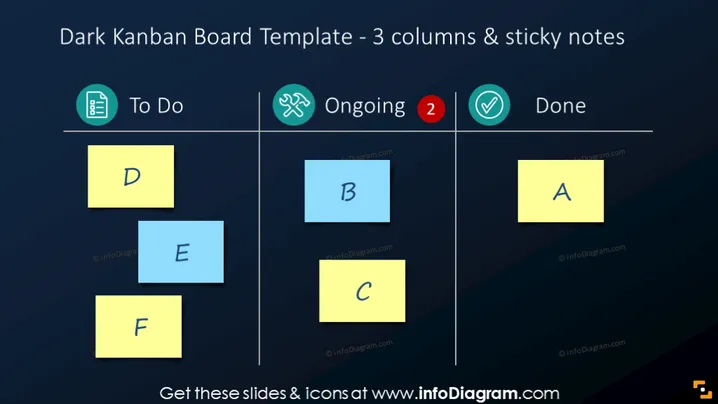
Dark Kanban Board Template - 3 columns & sticky notes
Slide Content
The slide presents a Kanban Board template that includes three status columns titled "To Do," "Ongoing," and "Done." Each column contains colored sticky notes with letters D, E, F for "To Do," B, C for "Ongoing," and A for "Done." This arrangement is meant to visually represent task management, prioritization, and workflow tracking. The use of different colored notes and labels helps to distinguish tasks and their respective statuses.
Graphical Look
- The background of the slide is a dark gradient, likely to emphasize the contrast with the colorful notes.
- There are three distinct columns delineated by white lines and labeled with icons and text in a lighter color.
- Each column has a corresponding icon at the top: a checklist for "To Do," tools for "Ongoing," and a checkmark for "Done."
- Colored sticky notes, yellow and blue, with bold lettering serve as placeholders for tasks within each column.
- A red notification bubble with the number "2" is placed on the "Ongoing" column icon, suggesting active tasks or updates needed.
The slide has a modern and clean aesthetic with a professional look suitable for business presentations. The use of color and simple icons effectively communicates the status of different tasks.
Use Cases
- Demonstrating workflow and task progress during team meetings or project updates.
- Tracking the status of different components of a project in a visual manner.
- Planning and organizing tasks for scrum or agile development processes.
- Quick visual reporting of work status during stakeholder or management presentations.
How to Edit
How to edit text & colors

How to expand / shorten diagram

How to Replace Icons in infoDiagram PPT


