
Reviews
Vos graphiques ajoutent une belle touche à mes présentations et je les ai récemment utilisés pour l'une de mes réunions générales. Votre boîte à outils ajoute du professionnalisme à mes diapositives. Au lieu d'utiliser des cliparts standards.
J'avais besoin d'un nouveau regard sur certaines de mes diapositives. J'ai essayé de trouver un moyen de créer un effet de pinceau, de souligner, d'accentuer, d'ajouter de la couleur et les marqueurs manuscrits étaient exactement ce qu'il fallait. Très facile à utiliser, facile à ajuster la taille, à changer la couleur. C'était une solution abordable et parfaite et je suis heureux de la recommander.
L'aspect net et épuré des graphiques, et le fait qu'il m'ait permis d'éditer et de changer facilement les couleurs pour les adapter au modèle, ont été les principales raisons de mon achat.
Description
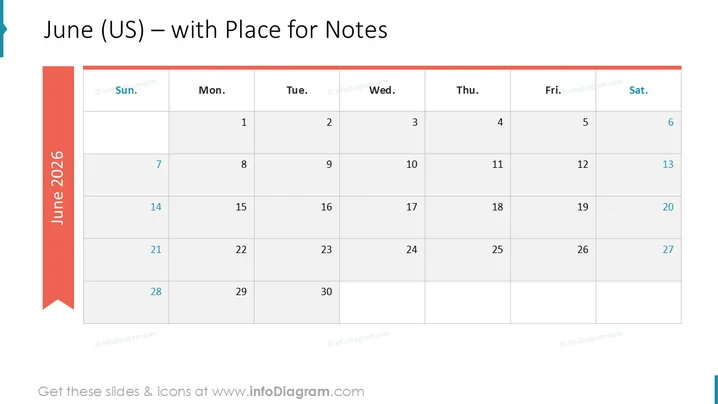
June (US) – with Place for Notes
Slide Content
The slide appears to be a template for the month of June 2026 according to the US calendar system, with additional space allocated for notes. The calendar is neatly laid out in a grid format with columns denoting days of the week, from Sunday to Saturday, and rows representing the weeks of the month. This format is standard for monthly calendars and is used to track dates and events within the month. The left-hand side features a vertical band that highlights the month and year, suggesting a clear emphasis on the timeframe being presented.
Graphical Look
- A large title on top of the slide in bold letters displays the text, "June (US) – with Place for Notes".
- On the left side, there is a teal vertical banner with the text "June 2025" oriented vertically and legible from bottom to top.
- A standard calendar layout is presented with seven columns, each headed by the abbreviated days of the week from "Sun." to "Sat.".
- Each date box is clearly delineated with thin borders, creating an organized matrix for the month.
- The color palette consists of white for the calendar grid, a muted blue for the weekdays' headers, and a bold teal for the side banner.
- There is no excessive decoration or imagery; the design is minimalistic and functional.
The overall look of the slide is clean and professional, with a simple color scheme providing a visual separation between different elements. The calendar is easy to read and visually intuitive, making it practical for a variety of purposes.
Use Cases
- Planning and scheduling meetings or events in a corporate environment for the month of June 2025.
- Displaying important dates, deadlines, or milestones during project management presentations.
- Utilizing as part of an educational presentation to outline academic deadlines or exam schedules.
- Serving as a monthly outlook for sales or marketing campaigns in business strategy sessions.
How to Edit
How to edit text & colors

How to expand / shorten diagram

How to Replace Icons in infoDiagram PPT


