
Reviews
Sus gráficos añaden un toque agradable a mis presentaciones y recientemente los usé para una de mis reuniones generales. Su conjunto de herramientas añade profesionalismo a mis diapositivas. En lugar de usar imágenes prediseñadas estándar.
Necesitaba un aspecto fresco para algunas de mis diapositivas. Había intentado encontrar una forma de crear un efecto de pincel, de subrayar, acentuar, añadir algo de color y los marcadores escritos a mano fueron justo lo que necesitaba. Muy fácil de usar, fácil de ajustar el tamaño, cambiar el color. Fue una solución asequible y perfecta, y estoy feliz de recomendarla.
El aspecto nítido y limpio de los gráficos, y el hecho de que me permitiera editar y cambiar fácilmente los colores para que coincidieran con la plantilla fue mi principal razón para comprarlos.
Description
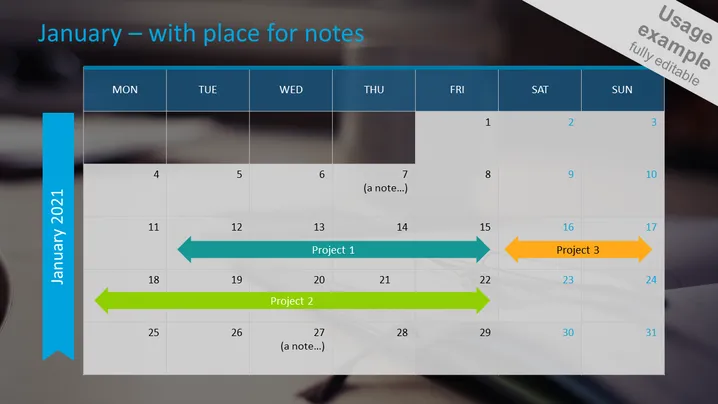
January – with place for notes
Slide Content
The PowerPoint slide functions as a calendar template for the month of January, with a layout enabling users to add notes and track projects. The days of the week are arranged horizontally across the top, while the dates are listed vertically along the side. "Add your text here" notes are superimposed on specific days, allowing customization. Project durations are illustrated using colored horizontal arrows spanning multiple days, indicating the timeline of each project and where they fall within the month. For example, "Project 1" is shown to start after the initial week of January, with its arrow indicating progress across the second week.
Graphical Look
- The slide has a dark blurred background with visible office elements.
- The calendar grid is semi-transparent, overlaying the background.
- The days of the week appear in dark blue cells with white text.
- Dates are listed along the left in gray cells with dark text.
- Three post-it note graphics serve as placeholders for additional text.
- Colored arrows with accompanying text boxes designate project timelines.
The slide has a professional aesthetic with a mix of transparent elements and bold colors. The mix of sticky note graphics and timeline arrows creates an interactive and dynamic feel.
Use Cases
- Tracking key milestones and deadlines for a project.
- Providing a visual overview of tasks and events in a team meeting.
- Organizing and presenting a monthly schedule during a planning session.
- Displaying company-wide important dates and deadlines in a corporate presentation.
How to Edit
How to edit text & colors

How to expand / shorten diagram

How to Replace Icons in infoDiagram PPT


