
Your graphics add a nice touch to my presentations and I recently used them for one of my all-hands meetings. Your toolbox adds professionalism to my slides. Instead of using standard clipart.
Claude Jones, Director of Engineer, @Walmartlabs, USA
Your graphics add a nice touch to my presentations and I recently used them for one of my all-hands meetings. Your toolbox adds professionalism to my slides. Instead of using standard clipart.
Claude Jones, Director of Engineer, @Walmartlabs, USA
I needed a fresh look at some of my slides. I've tried to find a way to create a paintbrush effect, to underline, accentuate, add some color and the handwritten markers were just the things. Very easy to use, easy to size, change the color. It was an affordable, perfect solution and I'm happy to recommend it.
Anonymous, US
The crisp, clean look of the graphics, and the fact that it allowed me to easily edit and change the colors to match the template was my main reason for purchasing them.
Brandie Jenkins, E-learning Developer, USA
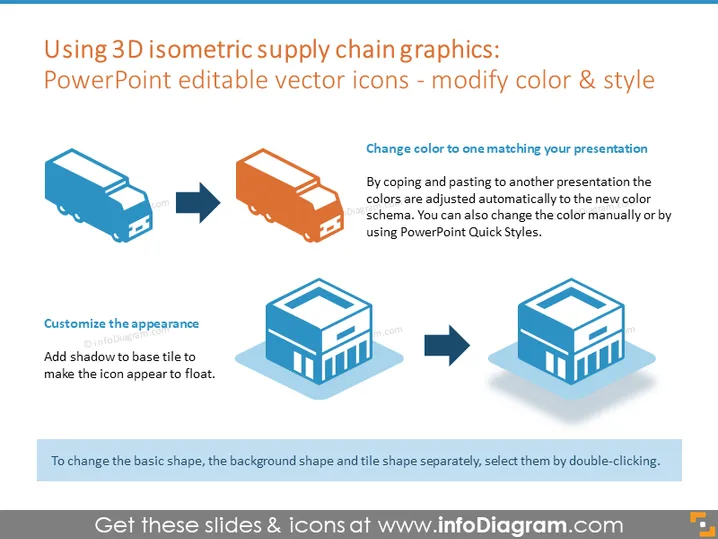
The PowerPoint slide is focused on demonstrating how 3D isometric supply chain graphics, specifically vector icons, can be edited to match the color and style of a presentation. It explains that colors can be adjusted automatically when the icons are copied and pasted into a new presentation with a different colors scheme, or colors can be manually changed using PowerPoint's Quick Styles. The slide also indicates that the appearance can be customized by adding a shadow to the base tile, giving the icon a floating effect.
The slide has a clean, professional design using isometric graphics to visually communicate the customizable nature of vector icons. The design is simple and straightforward, making effective use of before-and-after imagery to demonstrate editing capabilities.




