
Reviews
Ihre Grafiken verleihen meinen Präsentationen eine nette Note, und ich habe sie kürzlich für eines meiner All-Hands-Meetings verwendet. Ihre Toolbox verleiht meinen Folien Professionalität, anstatt Standard-Clipart zu verwenden.
Ich brauchte einen neuen Blick auf einige meiner Folien. Ich habe versucht, einen Weg zu finden, einen Pinselschlag-Effekt zu erzielen, um zu unterstreichen, hervorzuheben, Farbe hinzuzufügen, und die handgeschriebenen Markierungen waren genau das Richtige. Sehr einfach zu bedienen, leicht in der Größe zu ändern, die Farbe zu ändern. Es war eine erschwingliche, perfekte Lösung und ich empfehle sie gerne weiter.
Die klare, saubere Optik der Grafiken und die Tatsache, dass ich die Farben leicht bearbeiten und an die Vorlage anpassen konnte, war mein Hauptgrund für den Kauf.
Description
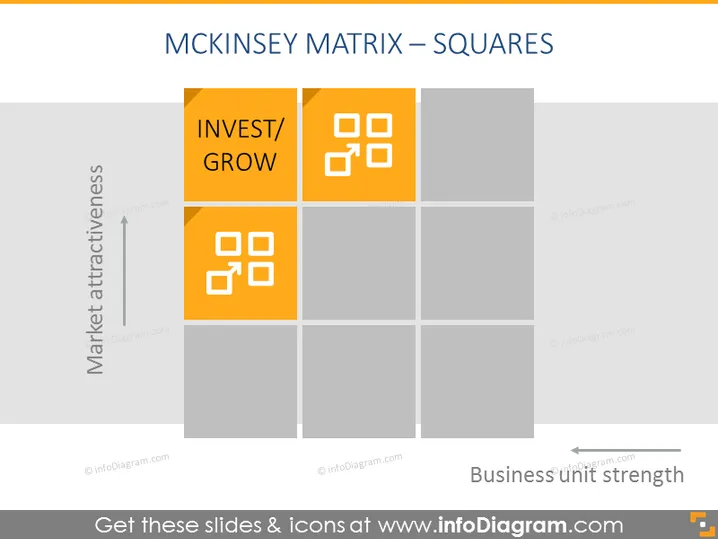
MCKINSEY MATRIX – SQUARES
Slide Content
The slide presents the McKinsey Matrix, also known as the General Electric Matrix or GE-McKinsey Nine-Box Matrix. This strategic tool is used to prioritize investments among various business units or product lines. The matrix divides the entities into three categories based on two dimensions: Market Attractiveness and Business Unit Strength. In the slide, only one category is labeled: the top-right squares are highlighted in orange and labeled 'INVEST/GROW,' signifying a high market attractiveness and strong business unit strength.
Graphical Look
- The slide features a 3x3 grid, creating nine squares.
- The axes are labeled with 'Market attractiveness' vertically and 'Business unit strength' horizontally.
- The vertical axis has an arrow pointing upwards, indicating increasing attractiveness.
- The horizontal axis has an arrow pointing rightwards, indicating increasing strength.
- The top right set of three squares is highlighted in orange to indicate a strategic focus.
- Icons representing business tools or processes populate the two orange squares that fall under 'INVEST/GROW.'
- A simple, sans serif font is used for text, which is clean and legible.
The overall look of the slide is minimalist and corporate, with a focus on function over form. The use of color highlights the recommended strategic action area, while the icons offer a visual cue about the activities or processes relevant to the 'INVEST/GROW' category.
Use Cases
- To analyze and present the relative position of business units or portfolios during a strategic review meeting.
- For visualizing investment priorities during financial planning discussions or budget allocation sessions.
- In educational settings or workshops to teach strategic management and portfolio analysis concepts.
- As part of a company's internal communications to explain strategic focus areas to employees or stakeholders.
How to Edit
How to edit text & colors

How to expand / shorten diagram

How to Replace Icons in infoDiagram PPT


