
Reviews
Your slides are my 'secret sauce' when it comes to visualising my ideas to clients. I'm saving so much time.
InfoDiagram has been a wonderful resource since I found the product site a few years ago.
Your slides often generate good comments and ideas from my team that improve the final slides.
Description
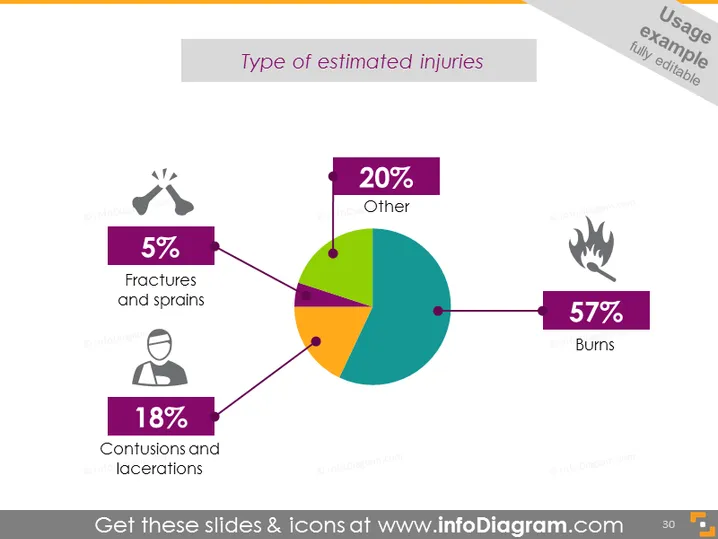
Type of Estimated Injuries
Slide Content
The PowerPoint slide titled "Type of Estimated Injuries" presents a pie chart divided into four sections: "57% Burns," "18% Contusions and lacerations," "5% Fractures and sprains," with an additional "20% Other" category. Each category is represented by a different color and has an associated icon that visually represents the type of injury, such as a flame for burns and a broken bone for fractures.
Graphical Look
- The slide features a large, colorful pie chart in the center.
- Each segment of the pie chart is connected to a colored rectangle that includes a percentage and description of the injury type.
- Accompanying icons for each injury type: a flame icon for burns, a person's head and shoulders for contusions and lacerations, and broken bones for fractures and sprains.
- The color palette consists of purple, green, orange, and teal, with purple being the most dominant for the text boxes.
- The background is a pale grey with a white frame bordering the slide content.
- There's a subdued orange banner in the top-right corner with text that is not part of the slide's analytical content.
The overall look of the slide is professional and clean, with a clear visual emphasis on the data represented by the pie chart. Icons and color-coding make it easy to identify each category of injuries at a glance.
Use Cases
- Presenting data on injury distribution in health and safety training.
- Summarizing key points of a medical report in a healthcare-related meeting.
- Illustrating statistical data in a research presentation on workplace accidents.
- Enhancing visual communication in an insurance claim report to show types of injuries covered.
How to Edit
How to edit text & colors

How to expand / shorten diagram

How to Replace Icons in infoDiagram PPT


