
Reviews
Your graphics add a nice touch to my presentations and I recently used them for one of my all-hands meetings. Your toolbox adds professionalism to my slides. Instead of using standard clipart.
I needed a fresh look at some of my slides. I've tried to find a way to create a paintbrush effect, to underline, accentuate, add some color and the handwritten markers were just the things. Very easy to use, easy to size, change the color. It was an affordable, perfect solution and I'm happy to recommend it.
The crisp, clean look of the graphics, and the fact that it allowed me to easily edit and change the colors to match the template was my main reason for purchasing them.
Description
Induction Training Plan
Slide Content
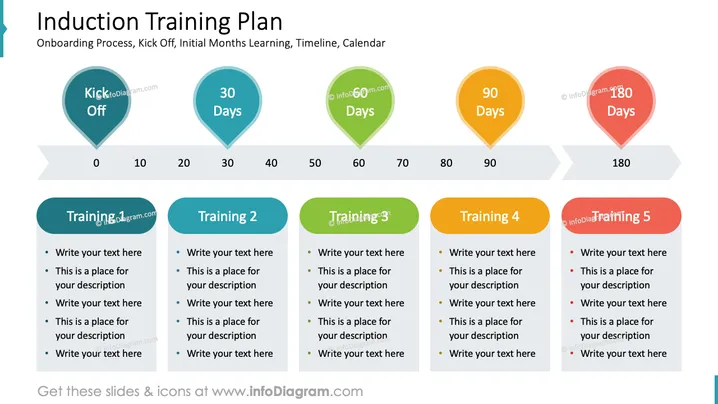
The slide, titled "Induction Training Plan," covers onboarding, initial learning, and includes a timeline from kickoff to 180 days. There are five key stages marked: Kick Off, 30 Days, 60 Days, 90 Days, and 180 Days. Each time point is associated with a training event. "Training 1" through "Training 5" labels are placeholders for specific session details. Each training event suggests an area for adding text or descriptions, which can be tailored to the organization's specific training modules and goals.
Graphical Look
- The slide features a horizontal timeline with a light gradient background.
- Atop the timeline are pointed chevron shapes that represent progression in time, with labels at 0, 10, 20, 30, 40, 50, 60, 70, 80, 90, and 180 days.
- Five map pin-like icons in different colors (cyan, teal, green, orange, and red) are placed along the timeline at significant milestones.
- Each map pin icon is labeled with a milestone: "Kick Off," "30 Days," "60 Days," "90 Days," and "180 Days."
- Below the timeline are five rounded rectangle shapes, each corresponding to a training phase, with space for adding detailed descriptions.
- The rounded rectangles are colored to match their respective map pin icons.
- Each rounded rectangle contains bullet points and placeholder texts suggesting where to insert information about the respective training session.
The slide has a clean, professional layout designed for clarity and ease of understanding. The use of color-coded icons and shapes helps to visually separate each phase of the induction training plan.
Use Cases
- Presenting the onboarding schedule and training overview to new employees during orientation.
- Outlining the employee development plan in management meetings.
- Used in human resources or training department meetings to discuss the progress and structure of employee onboarding. I'm sorry, but there is no image attached to your message. If you provide an image, I'd be happy to describe it for you or assist with any related questions you might have.
How to Edit
How to edit text & colors

How to expand / shorten diagram

How to Replace Icons in infoDiagram PPT


