
Reviews
Ihre Grafiken verleihen meinen Präsentationen eine nette Note, und ich habe sie kürzlich für eines meiner All-Hands-Meetings verwendet. Ihre Toolbox verleiht meinen Folien Professionalität, anstatt Standard-Clipart zu verwenden.
Ich brauchte einen neuen Blick auf einige meiner Folien. Ich habe versucht, einen Weg zu finden, einen Pinselschlag-Effekt zu erzielen, um zu unterstreichen, hervorzuheben, Farbe hinzuzufügen, und die handgeschriebenen Markierungen waren genau das Richtige. Sehr einfach zu bedienen, leicht in der Größe zu ändern, die Farbe zu ändern. Es war eine erschwingliche, perfekte Lösung und ich empfehle sie gerne weiter.
Die klare, saubere Optik der Grafiken und die Tatsache, dass ich die Farben leicht bearbeiten und an die Vorlage anpassen konnte, war mein Hauptgrund für den Kauf.
Description
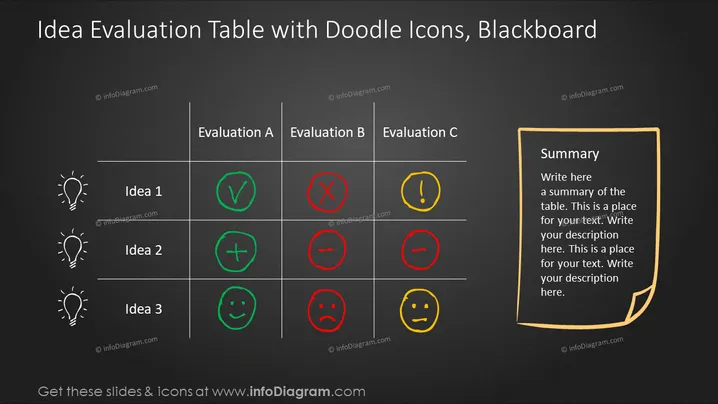
Idea Evaluation Table with Doodle Icons, Blackboard
Slide Content
The PowerPoint slide titled "Idea Evaluation Table with Doodle Icons, Blackboard" presents a comparison table used for evaluating three different ideas across multiple criteria (A, B, and C). Idea 1 has received positive feedback on Evaluation A, mixed feedback on Evaluation B, and a warning sign on Evaluation C. Idea 2 has mixed feedback across all evaluation criteria, while Idea 3 has positive feedback for Evaluation A, negative for Evaluation B, and neutral for Evaluation C. This structure promptly conveys the strengths and weaknesses of each idea and can aid in decision-making or discussions regarding project viability or improvement strategies.
Graphical Look
- The slide background resembles a blackboard texture with white and colored chalk-like elements.
- Three light bulb doodle icons are aligned on the left, each representing a different idea (Idea 1, Idea 2, Idea 3).
- A three-column table occupies the center of the slide with headings "Evaluation A," "Evaluation B," and "Evaluation C," each column containing various symbols.
- The symbols utilized to evaluate the ideas include a green check mark, a green plus sign, a green smiley face, a red "X," a red minus sign, a red sad face, a yellow exclamation mark, and a yellow neutral face, indicating different levels of assessment for each criterion.
- On the right, there is a stylized yellow sticky note with a "Summary" heading, providing a designated area to summarize the table's content.
- Each table cell is distinctly bordered with a light chalk-like line.
The overall look is engaging and thematic, using visuals reminiscent of classroom sketches to convey the concepts. The color choices for the symbols are clear and intuitive, with green denoting positive, red negative, and yellow caution or neutrality.
Use Cases
- To compare different business or project ideas during team meetings or strategy sessions.
- In startup pitches, to visually demonstrate the assessment of business concepts to potential investors or partners.
- For educational presentations, to teach students about idea evaluation and decision-making processes.
- As a graphic tool in workshops or brainstorming sessions to collaboratively rank and discuss creative proposals or solutions.
How to Edit
How to edit text & colors

How to expand / shorten diagram

How to Replace Icons in infoDiagram PPT


