
Reviews
Ihre Grafiken verleihen meinen Präsentationen eine nette Note, und ich habe sie kürzlich für eines meiner All-Hands-Meetings verwendet. Ihre Toolbox verleiht meinen Folien Professionalität, anstatt Standard-Clipart zu verwenden.
Ich brauchte einen neuen Blick auf einige meiner Folien. Ich habe versucht, einen Weg zu finden, einen Pinselschlag-Effekt zu erzielen, um zu unterstreichen, hervorzuheben, Farbe hinzuzufügen, und die handgeschriebenen Markierungen waren genau das Richtige. Sehr einfach zu bedienen, leicht in der Größe zu ändern, die Farbe zu ändern. Es war eine erschwingliche, perfekte Lösung und ich empfehle sie gerne weiter.
Die klare, saubere Optik der Grafiken und die Tatsache, dass ich die Farben leicht bearbeiten und an die Vorlage anpassen konnte, war mein Hauptgrund für den Kauf.
Description
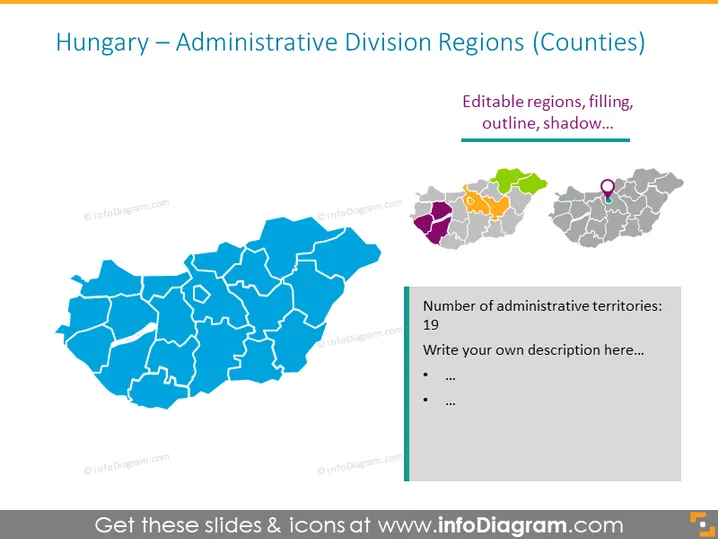
Hungary – Administrative Division Regions (Counties)
Slide Content
The slide presents a map-based overview of Hungary's administrative divisions, focusing on the regions or counties. There are 19 administrative territories indicated, with the slide providing editable map regions where users can customize the filling, outline, and shadow effects. Each county could represent various data points such as population, economic status, or governance structure depending on the end-user's goals.
Graphical Look
- The central element is a large, blue-colored map of Hungary, with individual counties outlined in white, suggesting their separateness and possible individual customizability.
- In the top right corner, there are smaller, colored versions of a section of the map, serving as an example of how the larger map can be color-coded.
- A purple circle icon on the smaller, colored map likely represents the capital or a specific point of interest.
- To the right side, there's a text box with an orange heading "Number of administrative territories: 19" followed by a placeholder text "Write your own description here..." and bullet points for additional information.
- The overall color palette includes shades of blue, gray, and multicolor accents for the small map examples.
The slide is clean and professional with a clear focus on the administrative divisions of Hungary. The visual elements are arranged to balance the informative content with graphical representation.
Use Cases
- Presenting regional statistical data such as population density, economic activity, or voting patterns to stakeholders.
- Educational purposes to teach students about the geographical and administrative organization of Hungary.
- Planning and discussing infrastructural developments or resource allocation in a business or governmental context.
- Using geographic segmentation for market analysis presentations in a business setting.
How to Edit
How to edit text & colors

How to expand / shorten diagram

How to Replace Icons in infoDiagram PPT


