

Your graphics add a nice touch to my presentations and I recently used them for one of my all-hands meetings. Your toolbox adds professionalism to my slides. Instead of using standard clipart.
Claude Jones, Director of Engineer, @Walmartlabs, USA

Your graphics add a nice touch to my presentations and I recently used them for one of my all-hands meetings. Your toolbox adds professionalism to my slides. Instead of using standard clipart.
Claude Jones, Director of Engineer, @Walmartlabs, USA
I needed a fresh look at some of my slides. I've tried to find a way to create a paintbrush effect, to underline, accentuate, add some color and the handwritten markers were just the things. Very easy to use, easy to size, change the color. It was an affordable, perfect solution and I'm happy to recommend it.
Anonymous, US
The crisp, clean look of the graphics, and the fact that it allowed me to easily edit and change the colors to match the template was my main reason for purchasing them.
Brandie Jenkins, E-learning Developer, USA
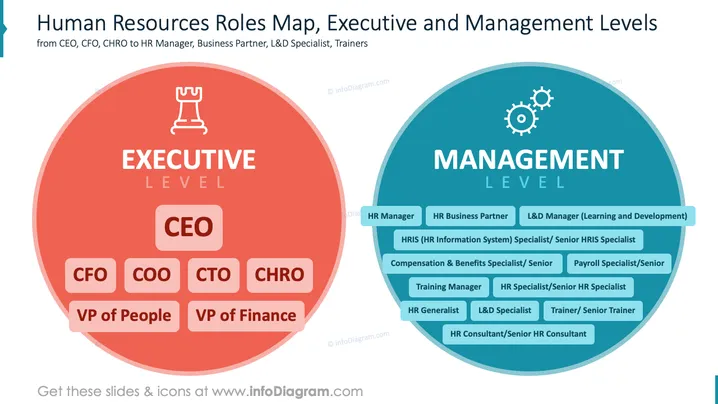
The slide illustrates the hierarchy within human resources, divided into executive and management levels. The Executive Level includes CEO (oversees company strategy), CFO (manages financial actions), COO (handles daily operations), CTO (leads technology), CHRO (guides human resources), VP of People (manages personnel), and VP of Finance (oversees financial health). The Management Level comprises HR Manager (administers HR activities), HR Business Partner (aligns HR with business goals), L&D Manager (develops training programs), and other specialized roles like HRIS Specialist (manages HR systems), and Payroll Specialist (handles employee compensation).
The slide effectively uses color and imagery to differentiate between levels of HR roles, offering visual clarity and quick understanding of organizational structure.



