
Reviews
Ihre Grafiken verleihen meinen Präsentationen eine nette Note, und ich habe sie kürzlich für eines meiner All-Hands-Meetings verwendet. Ihre Toolbox verleiht meinen Folien Professionalität, anstatt Standard-Clipart zu verwenden.
Ich brauchte einen neuen Blick auf einige meiner Folien. Ich habe versucht, einen Weg zu finden, einen Pinselschlag-Effekt zu erzielen, um zu unterstreichen, hervorzuheben, Farbe hinzuzufügen, und die handgeschriebenen Markierungen waren genau das Richtige. Sehr einfach zu bedienen, leicht in der Größe zu ändern, die Farbe zu ändern. Es war eine erschwingliche, perfekte Lösung und ich empfehle sie gerne weiter.
Die klare, saubere Optik der Grafiken und die Tatsache, dass ich die Farben leicht bearbeiten und an die Vorlage anpassen konnte, war mein Hauptgrund für den Kauf.
Description
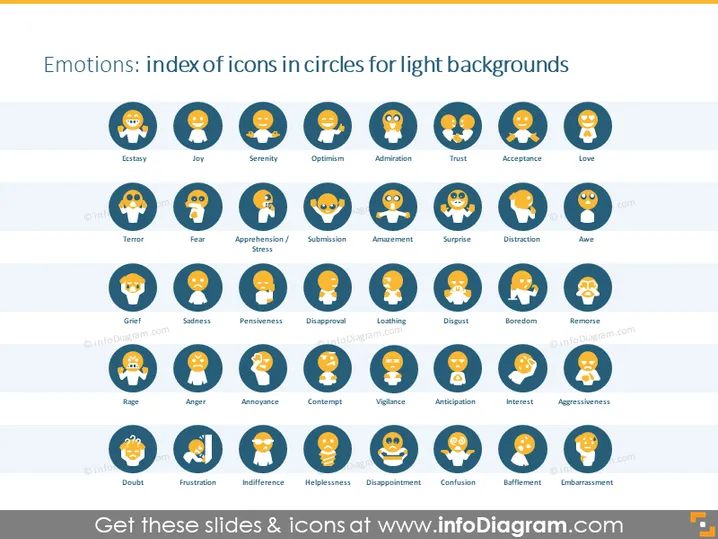
Emotions: index of icons in circles for light backgrounds
Slide Content
The PowerPoint slide is titled "Emotions: index of icons in circles for light backgrounds" and displays a range of emotional icons grouped by positive, neutral, and negative emotions. Each emotion is represented by a unique facial expression and is labeled accordingly. Emotions range from 'Ecstasy' to 'Embarrassment', each depicted as a round icon with a corresponding facial expression to convey the specific emotion it represents.
Graphical Look
- The slide background is light.
- The title is in dark text aligned to the top of the slide.
- There are several rows of round icons, each representing different emotions.
- Every icon has a color-coded background - likely to distinguish between positive, neutral, and negative emotions.
- Icons share a similar design style and are placed evenly across the slide.
- Each icon is accompanied by a label in a dark-colored font.
- The layout presents a grid structure, which provides visual organization.
The slide has a clean and systematic design with a grid layout that showcases the emotional icons neatly and makes it easy to comprehend at a glance.
Use Cases
- To illustrate various human emotions in a presentation on psychology or emotional intelligence.
- As a visual aid during a communication skills workshop to discuss how to read and recognize different emotions.
- For use in user experience (UX) design presentations, when explaining the different emotional responses users might have to a product or service.
- In a customer service training, to teach representatives about the emotional states of customers and how to respond appropriately.
How to Edit
How to edit text & colors

How to expand / shorten diagram

How to Replace Icons in infoDiagram PPT


