
Reviews
Sus gráficos añaden un toque agradable a mis presentaciones y recientemente los usé para una de mis reuniones generales. Su conjunto de herramientas añade profesionalismo a mis diapositivas. En lugar de usar imágenes prediseñadas estándar.
Necesitaba un aspecto fresco para algunas de mis diapositivas. Había intentado encontrar una forma de crear un efecto de pincel, de subrayar, acentuar, añadir algo de color y los marcadores escritos a mano fueron justo lo que necesitaba. Muy fácil de usar, fácil de ajustar el tamaño, cambiar el color. Fue una solución asequible y perfecta, y estoy feliz de recomendarla.
El aspecto nítido y limpio de los gráficos, y el hecho de que me permitiera editar y cambiar fácilmente los colores para que coincidieran con la plantilla fue mi principal razón para comprarlos.
Description
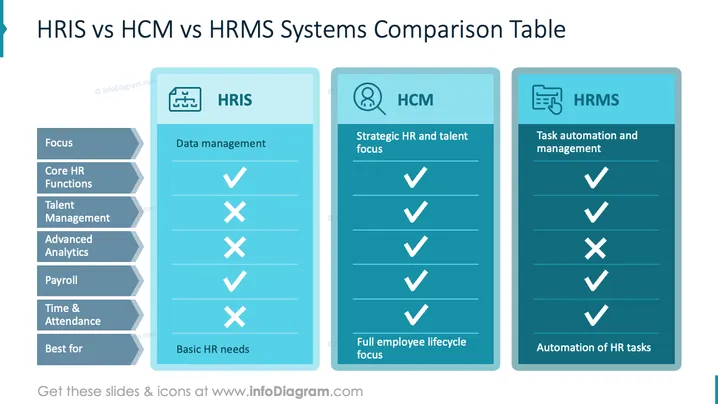
HRIS vs HCM vs HRMS Systems Comparison Table
Slide Content
This slide compares HRIS, HCM, and HRMS systems. HRIS is focused on data management and basic HR needs, emphasizing core HR functions and payroll. HCM targets strategic HR and talent management, covering all listed functionalities, including advanced analytics and full employee lifecycle support. HRMS centers on task automation and management related to HR tasks, fulfilling a comprehensive range of HR functionalities except talent management.
Graphical Look
- The slide is divided into three vertical sections, each representing HRIS, HCM, and HRMS.
- Each section has a header with a relevant icon - HRIS with a flowchart icon, HCM with a person and magnifier icon, and HRMS with a document icon.
- The left part of the slide lists different HR functionalities in blue boxes with angled edges.
- Checkmarks and crosses indicate the presence or absence of features in the systems.
- The color scheme includes shades of blue and teal, creating a professional and cohesive look.
Overall, the slide is visually organized with a clear contrast between sections using colors and icons. It succinctly communicates the comparison of different systems’ functionalities.
Use Cases
- Useful in HR software selection discussions to analyze different systems.
- Helpful in training sessions for HR professionals to understand system capabilities.
- Ideal for executive presentations to decide on HR system investments.
- Effective for consulting services explaining HR solutions to potential clients.
How to Edit
How to edit text & colors

How to expand / shorten diagram

How to Replace Icons in infoDiagram PPT


