
Reviews
Your graphics add a nice touch to my presentations and I recently used them for one of my all-hands meetings. Your toolbox adds professionalism to my slides. Instead of using standard clipart.
I needed a fresh look at some of my slides. I've tried to find a way to create a paintbrush effect, to underline, accentuate, add some color and the handwritten markers were just the things. Very easy to use, easy to size, change the color. It was an affordable, perfect solution and I'm happy to recommend it.
The crisp, clean look of the graphics, and the fact that it allowed me to easily edit and change the colors to match the template was my main reason for purchasing them.
Description
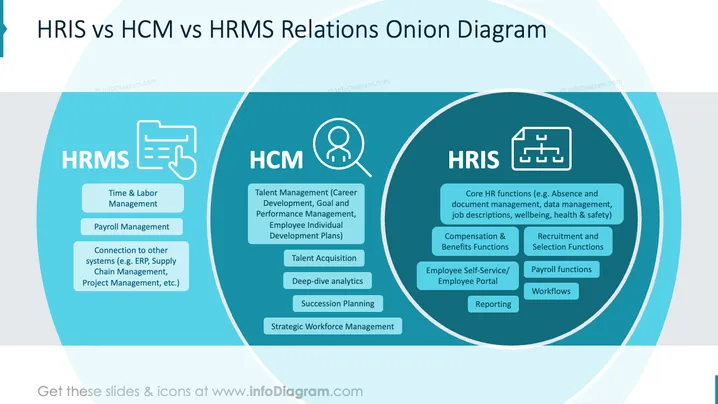
HRIS vs HCM vs HRMS Relations Onion Diagram
Slide Content
The slide compares HRMS, HCM, and HRIS systems. HRMS covers Time & Labor Management, Payroll Management, and connections to other systems (ERP, Supply Chain). HCM involves Talent Management, Talent Acquisition, Deep-dive analytics, Succession Planning, and Strategic Workforce Management. HRIS includes Core HR functions, Compensation & Benefits, Recruitment, Employee Self-Service, Payroll, Workflows, and Reporting.
Graphical Look
- The layout is an onion diagram with three sections: HRMS, HCM, and HRIS.
- Each section is enclosed in an overlapping circle, showcasing the interconnectedness.
- Icons depict each category: a document for HRMS, a person for HCM, and a flowchart for HRIS.
- The color scheme includes shades of blue for differentiation.
- Text blocks within circles list specific functions and features.
- Clean typography enhances readability.
Overall, the slide has a professionally designed, clear layout, effectively highlighting the distinctions and overlaps between HRMS, HCM, and HRIS. The use of icons and colors aids visual engagement.
Use Cases
- Presenting HR system differences in a corporate seminar.
- Educating management teams about HR technology solutions.
- Explaining HR systems to students in human resources courses.
- Consulting for businesses choosing suitable HR systems.
How to Edit
How to edit text & colors

How to expand / shorten diagram

How to Replace Icons in infoDiagram PPT


