

Your graphics add a nice touch to my presentations and I recently used them for one of my all-hands meetings. Your toolbox adds professionalism to my slides. Instead of using standard clipart.
Claude Jones, Director of Engineer, @Walmartlabs, USA

Your graphics add a nice touch to my presentations and I recently used them for one of my all-hands meetings. Your toolbox adds professionalism to my slides. Instead of using standard clipart.
Claude Jones, Director of Engineer, @Walmartlabs, USA
I needed a fresh look at some of my slides. I've tried to find a way to create a paintbrush effect, to underline, accentuate, add some color and the handwritten markers were just the things. Very easy to use, easy to size, change the color. It was an affordable, perfect solution and I'm happy to recommend it.
Anonymous, US
The crisp, clean look of the graphics, and the fact that it allowed me to easily edit and change the colors to match the template was my main reason for purchasing them.
Brandie Jenkins, E-learning Developer, USA
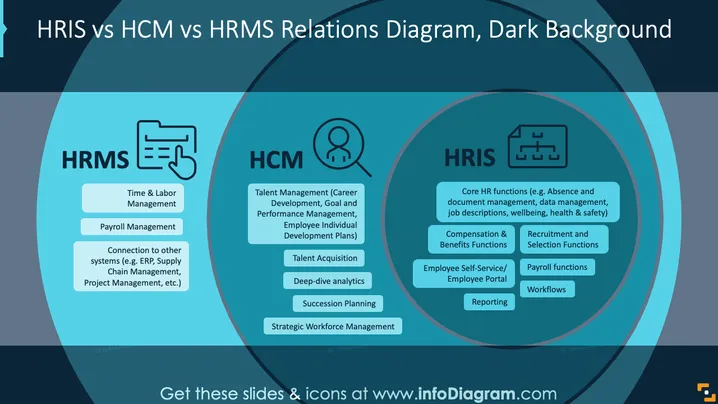
The PowerPoint slide illustrates the differences between HRIS, HCM, and HRMS. HRMS includes time and labor management, payroll services, and connections to other systems like ERP and project management. HCM covers talent management and acquisition, deep-dive analytics, succession planning, and strategic workforce management. HRIS focuses on core HR functions, compensation and benefits, recruitment, employee portals, payroll functions, workflows, and reporting.
The slide's design effectively conveys multiple complex concepts through simple shapes and text. It uses color contrast and alignment to ensure easy readability and quick understanding.



