Reviews
Sus gráficos añaden un toque agradable a mis presentaciones y recientemente los usé para una de mis reuniones generales. Su conjunto de herramientas añade profesionalismo a mis diapositivas. En lugar de usar imágenes prediseñadas estándar.
Necesitaba un aspecto fresco para algunas de mis diapositivas. Había intentado encontrar una forma de crear un efecto de pincel, de subrayar, acentuar, añadir algo de color y los marcadores escritos a mano fueron justo lo que necesitaba. Muy fácil de usar, fácil de ajustar el tamaño, cambiar el color. Fue una solución asequible y perfecta, y estoy feliz de recomendarla.
El aspecto nítido y limpio de los gráficos, y el hecho de que me permitiera editar y cambiar fácilmente los colores para que coincidieran con la plantilla fue mi principal razón para comprarlos.
Description
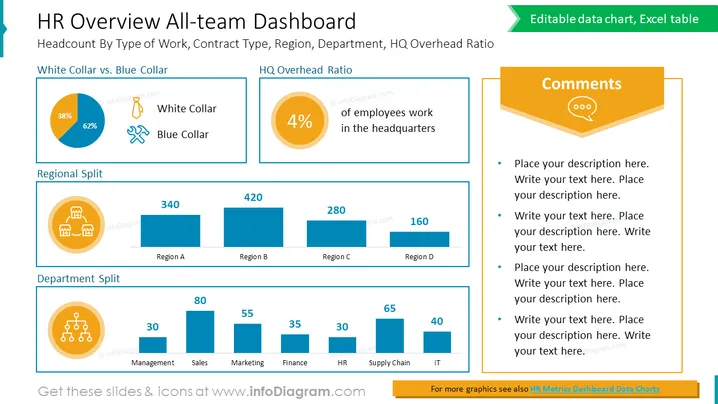
HR Overview All-team Dashboard
Slide Content:
- Headcount by type of work: This shows the percentage of employees who work in white-collar versus blue-collar jobs. (White-collar: 62%, Blue-collar: 38%)
- HQ overhead ratio: This shows the percentage of employees who work in the headquarters. (4%)
- Regional split: This shows the number of employees in each region. (Region A: 340, Region B: 420, Region C: 280, Region D: 160)
- Department split: This shows the number of employees in each department. (Management: 80, Sales: 30, Marketing: 55, Finance: 65, HR: 35, Supply Chain: 30, IT: 40)
Graphical Look:
- The slide has a simple and clean design.
- The chart shows the headcount by type of work and the HQ overhead ratio.
- The table shows the regional split and department split.
- The slide also includes a few icons to illustrate the different HR concepts.
Overall, the slide is a well-designed and informative dashboard that provides a snapshot of the company's HR data.
Use Cases
This slide can be used in a variety of business presentations, such as:

- Executive presentations: This slide can be used to give executives a quick overview of the company's HR data.
- Board meetings: This slide can be used to present the HR data to the board of directors.
- Investor presentations: This slide can be used to present the HR data to potential investors.
- HR team presentations: This slide can be used by the HR team to present their data to the rest of the company.
- Sales presentations: This slide can be used by sales teams to show potential customers how the company is investing in its people.
How to Edit
How to edit text & colors

How to expand / shorten diagram

How to Replace Icons in infoDiagram PPT


