

Your graphics add a nice touch to my presentations and I recently used them for one of my all-hands meetings. Your toolbox adds professionalism to my slides. Instead of using standard clipart.
Claude Jones, Director of Engineer, @Walmartlabs, USA

Your graphics add a nice touch to my presentations and I recently used them for one of my all-hands meetings. Your toolbox adds professionalism to my slides. Instead of using standard clipart.
Claude Jones, Director of Engineer, @Walmartlabs, USA
I needed a fresh look at some of my slides. I've tried to find a way to create a paintbrush effect, to underline, accentuate, add some color and the handwritten markers were just the things. Very easy to use, easy to size, change the color. It was an affordable, perfect solution and I'm happy to recommend it.
Anonymous, US
The crisp, clean look of the graphics, and the fact that it allowed me to easily edit and change the colors to match the template was my main reason for purchasing them.
Brandie Jenkins, E-learning Developer, USA
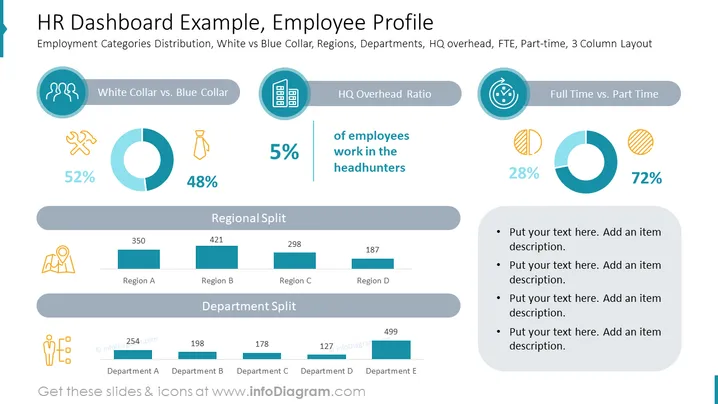
The slide presents various human resource metrics in a dashboard format, emphasizing employment category distribution, with distinctions including White Collar vs. Blue Collar, the ratio of headquarters overhead, and the full-time vs. part-time employee ratio. The 'White Collar vs. Blue Collar' section shows a nearly even split with 52% white-collar and 48% blue-collar workers. The 'HQ Overhead Ratio' is minimal at 5%. Finally, a more significant portion of employees work full time, with 72% compared to 28% part-time. There are also bar graphs displaying 'Regional Split' and 'Department Split', providing quantified data across different organizational divisions.
The overall look is sleek and modern, utilizing a consistent color scheme of blues and teals that effectively highlights the data presented. The use of icons and charts makes the information easily digestible and visually appealing.



