
Reviews
Sus gráficos añaden un toque agradable a mis presentaciones y recientemente los usé para una de mis reuniones generales. Su conjunto de herramientas añade profesionalismo a mis diapositivas. En lugar de usar imágenes prediseñadas estándar.
Necesitaba un aspecto fresco para algunas de mis diapositivas. Había intentado encontrar una forma de crear un efecto de pincel, de subrayar, acentuar, añadir algo de color y los marcadores escritos a mano fueron justo lo que necesitaba. Muy fácil de usar, fácil de ajustar el tamaño, cambiar el color. Fue una solución asequible y perfecta, y estoy feliz de recomendarla.
El aspecto nítido y limpio de los gráficos, y el hecho de que me permitiera editar y cambiar fácilmente los colores para que coincidieran con la plantilla fue mi principal razón para comprarlos.
Description
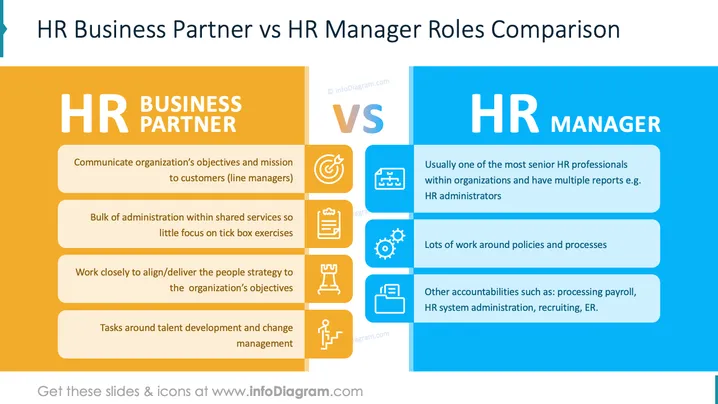
HR Business Partner vs HR Manager Roles Comparison
Slide Content
This slide compares the roles of HR Business Partners and HR Managers. An HR Business Partner communicates organizational objectives to customers, manages shared services, aligns strategies, and focuses on talent development. In contrast, an HR Manager typically holds a senior HR position, manages multiple reports, deals extensively with policies, and handles payroll, system administration, and recruiting.
Graphical Look
- The slide is divided into two halves: left in orange for HR Business Partner, right in blue for HR Manager.
- Each section contains a title with bold, white text: "HR BUSINESS PARTNER" and "HR MANAGER".
- Underneath the titles, each role's responsibilities are listed in rounded rectangles.
- HR Business Partner section includes four tan rectangles with individual responsibilities and corresponding icons.
- HR Manager section includes lighter blue rectangles, also with responsibilities and icons.
- A large "VS" is in the center, colored in a gradient from orange to blue.
- Icons relate to each role’s duties: target, checklist, strategic alignment, and talent development for HR Business Partners, and organizational structure, policy gears, and recruiting tasks for HR Managers.
Overall, the slide is cleanly organized with a symmetrical and balanced design, using contrasting colors for clear differentiation.
Use Cases
- Comparing and contrasting roles in HR workshops.
- Training new HR employees on organizational structures and responsibilities.
- Presentations on HR career development and role expectations.
- Business meetings to clarify HR role responsibilities and focus areas.
How to Edit
How to edit text & colors

How to expand / shorten diagram

How to Replace Icons in infoDiagram PPT


