

Your graphics add a nice touch to my presentations and I recently used them for one of my all-hands meetings. Your toolbox adds professionalism to my slides. Instead of using standard clipart.
Claude Jones, Director of Engineer, @Walmartlabs, USA

Your graphics add a nice touch to my presentations and I recently used them for one of my all-hands meetings. Your toolbox adds professionalism to my slides. Instead of using standard clipart.
Claude Jones, Director of Engineer, @Walmartlabs, USA
I needed a fresh look at some of my slides. I've tried to find a way to create a paintbrush effect, to underline, accentuate, add some color and the handwritten markers were just the things. Very easy to use, easy to size, change the color. It was an affordable, perfect solution and I'm happy to recommend it.
Anonymous, US
The crisp, clean look of the graphics, and the fact that it allowed me to easily edit and change the colors to match the template was my main reason for purchasing them.
Brandie Jenkins, E-learning Developer, USA
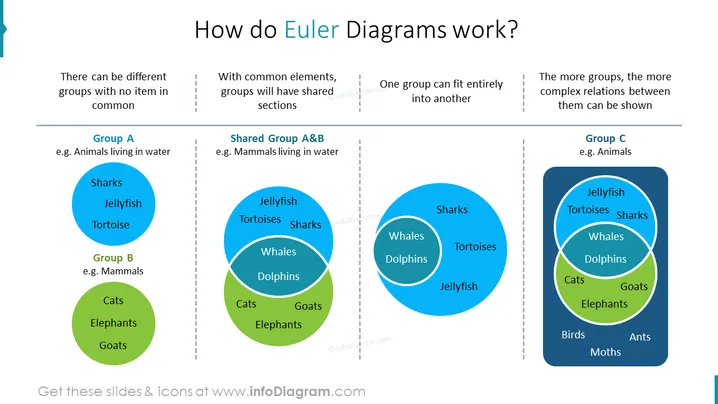
##Slide contents: The Euler Diagram Template explains how Euler Diagrams work. This example consists of four columns. The first column shows the difference between sets with no items in common. For example, group A shows animals living in water such as sharks, jellyfish, and tortoises; group B contains mammals like cats, elephants, and goats. The second column shows that groups will have shared sections with common elements. For instance, the common elements in groups A and B are whales and dolphins because they are mammals who live in water. The third column shows that one set can fit entirely into another. The last column demonstrates that as there are more sets, the more complex relations between them can be shown. For example, sets A and B are animals that are part of set C. You can create an Euler diagram if you are a marketing specialist who wants to visualize the relationship between different sets of target customer groups in an elegant presentation design. You can download this PPT template on Google Slides and Keynote. ##Slide Infographic Description: White Background, Text Box, Blue Circle, Green Circle, Dark Blue Rectangle



