
Reviews
Your graphics add a nice touch to my presentations and I recently used them for one of my all-hands meetings. Your toolbox adds professionalism to my slides. Instead of using standard clipart.
I needed a fresh look at some of my slides. I've tried to find a way to create a paintbrush effect, to underline, accentuate, add some color and the handwritten markers were just the things. Very easy to use, easy to size, change the color. It was an affordable, perfect solution and I'm happy to recommend it.
The crisp, clean look of the graphics, and the fact that it allowed me to easily edit and change the colors to match the template was my main reason for purchasing them.
Description
How ChatGPT Creates Answers? Generative AI Model
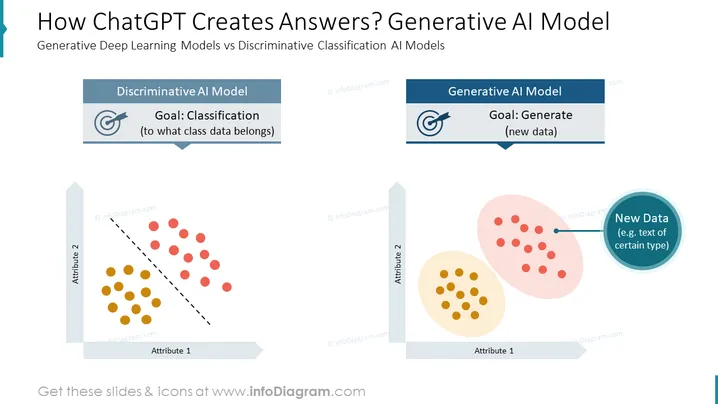
Slide Content: This slide contrasts Generative Deep Learning Models against Discriminative Classification AI Models. It demonstrates how ChatGPT, a type of generative model, produces answers. The slide divides the content into two sections. One for the Discriminative AI Model highlighting its goal of classification, which means determining the class to which data belongs. The other for the Generative AI Model, underlining its objective to generate new data. Each concept is paired with a two-dimensional graph that represents data points.
Graphical Look:
- The slide background is white, creating a clean and professional appearance.
- Two contrasting sections, each with a distinctive color theme: blue for the Discriminative AI Model and teal for the Generative AI Model.
- Each section has a title box with a slight gradient, an icon, and a goal description beneath the title.
- The Discriminative AI Model section contains a scatter plot with two groups of data points separated by a dashed line, indicating classification.
- The Generative AI Model section features overlapping cloud-like shapes with data points inside, suggesting data generation, and an additional circle labeled "New Data" overlaps the clouds.
The overall look of the slide is modern and informative, with a clear differentiation between the two AI model types through the use of distinct colors and graphics. The icons and plots are designed to visually communicate the functions of each AI model type.
Use Cases:
- To educate an audience about the different approaches in AI and how generative models like ChatGPT work.
- During a technical presentation to compare and contrast AI model architectures and their applications.
- In a business meeting to discuss the potential impacts of implementing AI solutions like ChatGPT.
- As a visual aid in academic lectures or workshops about machine learning and artificial intelligence.
How to Edit
How to edit text & colors

How to expand / shorten diagram

How to Replace Icons in infoDiagram PPT


