

Your graphics add a nice touch to my presentations and I recently used them for one of my all-hands meetings. Your toolbox adds professionalism to my slides. Instead of using standard clipart.
Claude Jones, Director of Engineer, @Walmartlabs, USA

Your graphics add a nice touch to my presentations and I recently used them for one of my all-hands meetings. Your toolbox adds professionalism to my slides. Instead of using standard clipart.
Claude Jones, Director of Engineer, @Walmartlabs, USA
I needed a fresh look at some of my slides. I've tried to find a way to create a paintbrush effect, to underline, accentuate, add some color and the handwritten markers were just the things. Very easy to use, easy to size, change the color. It was an affordable, perfect solution and I'm happy to recommend it.
Anonymous, US
The crisp, clean look of the graphics, and the fact that it allowed me to easily edit and change the colors to match the template was my main reason for purchasing them.
Brandie Jenkins, E-learning Developer, USA
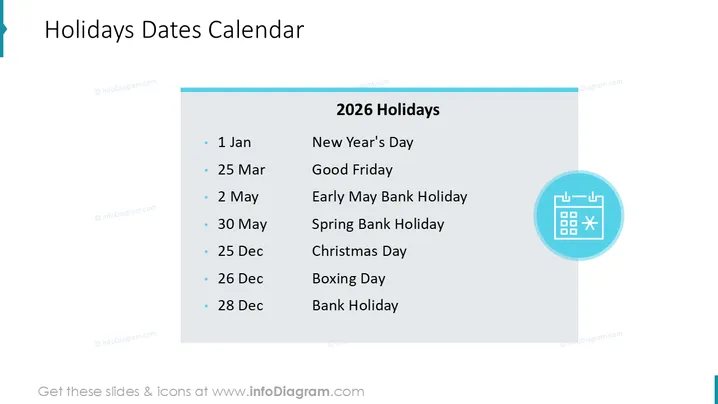
The PowerPoint slide presents a "2026 Holidays" calendar, listing various dates alongside their corresponding holidays: 1 Jan for New Year's Day, a fresh start celebrated globally; 25 Mar for Good Friday, a Christian holiday commemorating the crucifixion of Jesus; 2 May as Early May Bank Holiday, a public holiday in many countries; 30 May for Spring Bank Holiday, marking the beginning of spring; 25 Dec for Christmas Day, celebrating the birth of Jesus Christ; 26 Dec as Boxing Day, a holiday traditionally for giving to the poor; and 28 Dec as another Bank Holiday, a day when banks and many offices are closed.
The slide has a clean, professional appearance with a clear division between the title and content. The icon suggests planning or calculation related to the listed holiday dates.



