
Reviews
Your slides are my "secret sauce" when it comes to presenting my ideas to clients. I save a lot of time.
J'avais un délai de livraison à respecter et je n'avais pas le temps de créer une variété de modèles de diapositives. Infodiagram m'a proposé des options faciles à télécharger et à personnaliser en fonction de mes besoins !
Vos diapositives suscitent souvent de précieux commentaires et idées de la part de mon équipe, ce qui améliore les diapositives finales.
Description
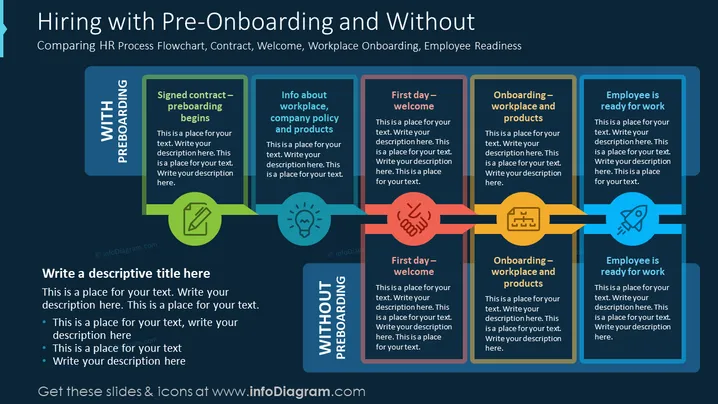
Presentation of Hiring with Pre-Onboarding and Without ### The PPT slide
presents comparison of two ways of hiring, including those steps: Signed contract - Pre-onboarding begins * Pre-onboarding is the process of preparing a new employee for their first day of work. It can start as soon as the employee accepts the job offer and continue up until their start date. Info about workplace, company policy, and products - Pre-onboarding * Pre- onboarding can include sending the employee information about the company culture, policies, and products. It can also include providing them with access to company resources, such as the employee portal or intranet. First day - welcome - First day * On the employee's first day, they should be welcomed by their manager and team members. They should also be given a tour of the office and introduced to the company's onboarding process. Employee is ready for work - Workplace and products * Once the employee has completed onboarding, they should be ready to start working on their projects and contributing to the team. Hiring without pre-onboarding - Onboarding - workplace and products * Companies that do not have a pre-onboarding process typically start onboarding on the employee's first day. This can be overwhelming for new employees, and it can take them longer to get up to speed. ### Slide Graphics The slide has a simple design with a white background and black text. There are two rows on the slide, one for hiring with pre-onboarding and one for hiring without pre-onboarding. Each row contains a timeline of the hiring process, with the steps involved in pre- onboarding and onboarding. There are also five icons on the slide. The icons for hiring with pre-onboarding are a clipboard and a handshake.
How to Edit
How to edit text & colors

How to expand / shorten diagram

How to Replace Icons in infoDiagram PPT


