

Your graphics add a nice touch to my presentations and I recently used them for one of my all-hands meetings. Your toolbox adds professionalism to my slides. Instead of using standard clipart.
Claude Jones, Director of Engineer, @Walmartlabs, USA

Your graphics add a nice touch to my presentations and I recently used them for one of my all-hands meetings. Your toolbox adds professionalism to my slides. Instead of using standard clipart.
Claude Jones, Director of Engineer, @Walmartlabs, USA
I needed a fresh look at some of my slides. I've tried to find a way to create a paintbrush effect, to underline, accentuate, add some color and the handwritten markers were just the things. Very easy to use, easy to size, change the color. It was an affordable, perfect solution and I'm happy to recommend it.
Anonymous, US
The crisp, clean look of the graphics, and the fact that it allowed me to easily edit and change the colors to match the template was my main reason for purchasing them.
Brandie Jenkins, E-learning Developer, USA
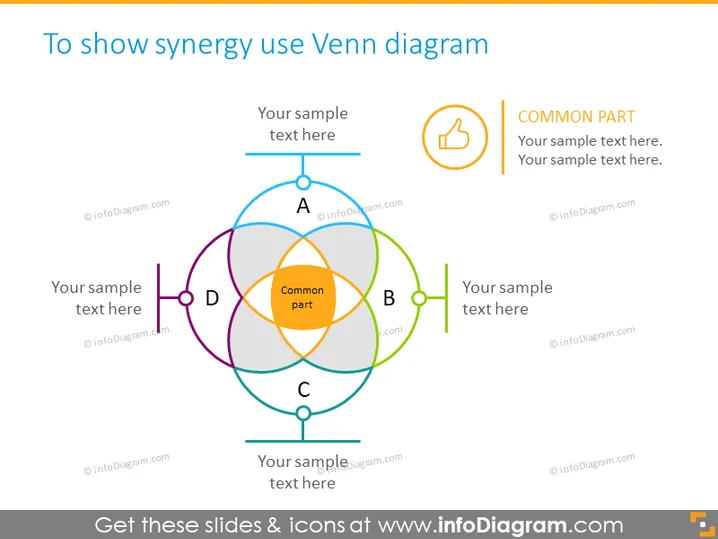
The PowerPoint slide illustrates how to depict synergy using a Venn diagram. It showcases a central overlapping area labeled "Common part," which signifies the synergy among four different items, A, B, C, and D. Around this intersecting center, there are placeholders for text related to each item. These labels provide space for expanding on what each concept means and how they collectively contribute to the "Common part," demonstrating their interconnectedness and the combined effect they produce.
The slide has a clean, professional look with a balanced use of colors that correspond to the sections of the Venn diagram. The main focus is on the diagram itself, and the text boxes are strategically placed to facilitate an easy understanding of the content.



