
Reviews
Ihre Grafiken verleihen meinen Präsentationen eine nette Note, und ich habe sie kürzlich für eines meiner All-Hands-Meetings verwendet. Ihre Toolbox verleiht meinen Folien Professionalität, anstatt Standard-Clipart zu verwenden.
Ich brauchte einen neuen Blick auf einige meiner Folien. Ich habe versucht, einen Weg zu finden, einen Pinselschlag-Effekt zu erzielen, um zu unterstreichen, hervorzuheben, Farbe hinzuzufügen, und die handgeschriebenen Markierungen waren genau das Richtige. Sehr einfach zu bedienen, leicht in der Größe zu ändern, die Farbe zu ändern. Es war eine erschwingliche, perfekte Lösung und ich empfehle sie gerne weiter.
Die klare, saubere Optik der Grafiken und die Tatsache, dass ich die Farben leicht bearbeiten und an die Vorlage anpassen konnte, war mein Hauptgrund für den Kauf.
Description
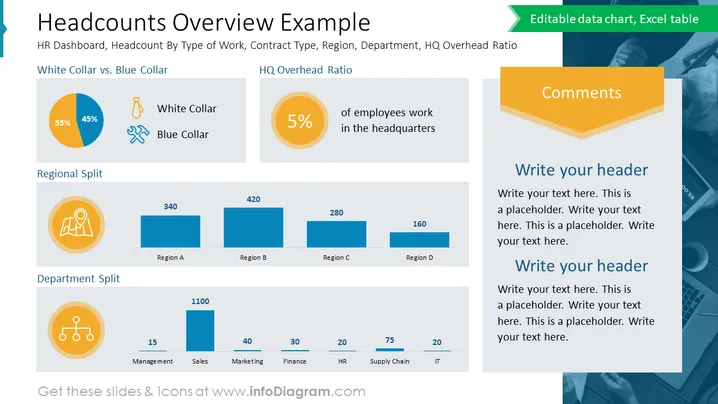
Headcounts Overview Example
Slide Content
The slide presents a statistical breakdown of an organization's workforce, categorized by job type, regional distribution, and departmental allocation. It features a "White Collar vs. Blue Collar" pie chart showing a split of 55% to 45%, an "HQ Overhead Ratio" highlighting that 5% of employees work at headquarters, a "Regional Split" with numerical distributions across four regions, and a "Department Split" providing headcount figures for management, sales, marketing, finance, HR, supply chain, and IT departments. Each section is accompanied by icons that visually represent the categories, emphasizing the data's divisions and allowing for at-a-glance comprehension of the company's structural demographics.
Graphical Look
- The slide has a clean, professional design with a blue and teal color scheme.
- The title "Headcounts Overview Example" is in bold, dark text at the top of the slide.
- Below the title, there is a subtitle in smaller text providing additional context for the data.
- The slide is divided into four content areas, each with its header and associated icon or chart.
- A pie chart with blue and teal slices represents the "White Collar vs. Blue Collar" workforce split, accompanied by worker icons.
- An orange circular icon with the number "5%" represents the "HQ Overhead Ratio," along with a brief explanation.
- A horizontal bar chart displays the "Regional Split," with bars in varying shades of blue indicating headcount numbers for regions A to D.
- Another bar chart presents the "Department Split," with vertical bars and small circular icons above each bar to represent different departments.
- To the right, there is a designated "Comments" section with an orange header, and two placeholders for custom headers underneath.
The slide has a well-organized layout with clearly defined sections for different data points and a harmonious color palette. The icons and charts are used effectively to illustrate the quantitative information, enabling quick visual interpretation.
Use Cases
- Presenting employee demographics and distribution in a corporate setting during HR or workforce planning meetings.
- Providing an organizational overview to stakeholders or new employees to familiarize them with company structure.
- Analyzing staffing data to inform strategic decisions such as regional investments, department expansion, or restructuring.
- Supplementing annual reports or investment pitches with visual data about the company's human resources.
How to Edit
How to edit text & colors

How to expand / shorten diagram

How to Replace Icons in infoDiagram PPT


