
Reviews
Sus gráficos añaden un toque agradable a mis presentaciones y recientemente los usé para una de mis reuniones generales. Su conjunto de herramientas añade profesionalismo a mis diapositivas. En lugar de usar imágenes prediseñadas estándar.
Necesitaba un aspecto fresco para algunas de mis diapositivas. Había intentado encontrar una forma de crear un efecto de pincel, de subrayar, acentuar, añadir algo de color y los marcadores escritos a mano fueron justo lo que necesitaba. Muy fácil de usar, fácil de ajustar el tamaño, cambiar el color. Fue una solución asequible y perfecta, y estoy feliz de recomendarla.
El aspecto nítido y limpio de los gráficos, y el hecho de que me permitiera editar y cambiar fácilmente los colores para que coincidieran con la plantilla fue mi principal razón para comprarlos.
Description
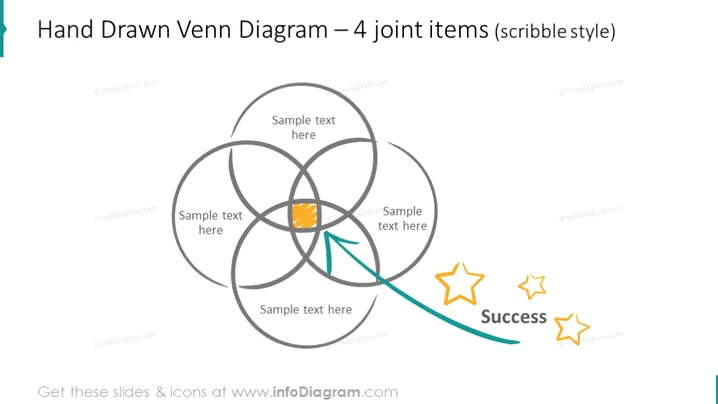
Hand Drawn Venn Diagram – 4 joint items (scribble style)
Slide Content
The slide presents a hand-drawn Venn diagram with four overlapping circles in a scribble style. Each circle has a space for text, indicating the relationships or intersections between different concepts or ideas. One section of the overlap is emphasized with a shading and an arrow pointing towards it, suggesting a particular focus or outcome, labeled "Success" accompanied by three stylized star icons, indicating achievement or a positive result.
Graphical Look
- The Venn diagram consists of four interlocking loops drawn in a loose, sketch-like manner.
- A specific segment of the diagram is highlighted with an orange fill.
- A curved arrow originating from the bottom points to the emphasized segment.
- The word "Success" is written in a bold, casual script to the right of the diagram.
- Three stars with varying sizes and opacities accompany the "Success" text, contributing to the achievement theme.
- The background of the slide is plain white, which accentuates the sketched elements.
The overall look of the slide is informal and creative, emphasizing a hand-drawn aesthetic. The use of color and icons adds a touch of emphasis and visual interest.
Use Cases
- To illustrate the shared goals or outcomes of different teams or departments within a company.
- To demonstrate the intersection of multiple business strategies and the resulting successful outcomes.
- To facilitate a brainstorming session where various ideas or concepts need to be visually mapped and interconnected.
- To explain complex project dependencies or relationships during a workshop or training session.
How to Edit
How to edit text & colors

How to expand / shorten diagram

How to Replace Icons in infoDiagram PPT


