

Your graphics add a nice touch to my presentations and I recently used them for one of my all-hands meetings. Your toolbox adds professionalism to my slides. Instead of using standard clipart.
Claude Jones, Director of Engineer, @Walmartlabs, USA

Your graphics add a nice touch to my presentations and I recently used them for one of my all-hands meetings. Your toolbox adds professionalism to my slides. Instead of using standard clipart.
Claude Jones, Director of Engineer, @Walmartlabs, USA
I needed a fresh look at some of my slides. I've tried to find a way to create a paintbrush effect, to underline, accentuate, add some color and the handwritten markers were just the things. Very easy to use, easy to size, change the color. It was an affordable, perfect solution and I'm happy to recommend it.
Anonymous, US
The crisp, clean look of the graphics, and the fact that it allowed me to easily edit and change the colors to match the template was my main reason for purchasing them.
Brandie Jenkins, E-learning Developer, USA
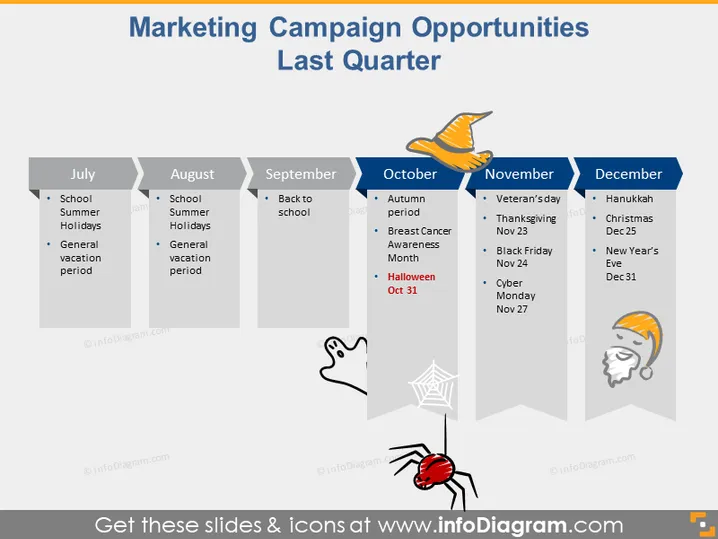
The slide is titled "Marketing Campaign Opportunities Last Quarter" and showcases important dates and events in the last quarter of the year that could be leveraged for marketing campaigns. Each month from July to December has its own column with a list of significant events. For instance, July includes "School Summer Holidays" and a "General vacation period," which indicates school recess and the typical time for family vacations. October features "Breast Cancer Awareness Month" and "Halloween Oct 31" emphasizing health awareness campaigns and a widely celebrated holiday.
The overall look of the slide is clean and organized, with a playful touch provided by the seasonal icons. It uses a limited color palette which gives it a cohesive and professional appearance.



