
Reviews
Vos graphiques ajoutent une belle touche à mes présentations et je les ai récemment utilisés pour l'une de mes réunions générales. Votre boîte à outils ajoute du professionnalisme à mes diapositives. Au lieu d'utiliser des cliparts standards.
J'avais besoin d'un nouveau regard sur certaines de mes diapositives. J'ai essayé de trouver un moyen de créer un effet de pinceau, de souligner, d'accentuer, d'ajouter de la couleur et les marqueurs manuscrits étaient exactement ce qu'il fallait. Très facile à utiliser, facile à ajuster la taille, à changer la couleur. C'était une solution abordable et parfaite et je suis heureux de la recommander.
L'aspect net et épuré des graphiques, et le fait qu'il m'ait permis d'éditer et de changer facilement les couleurs pour les adapter au modèle, ont été les principales raisons de mon achat.
Description
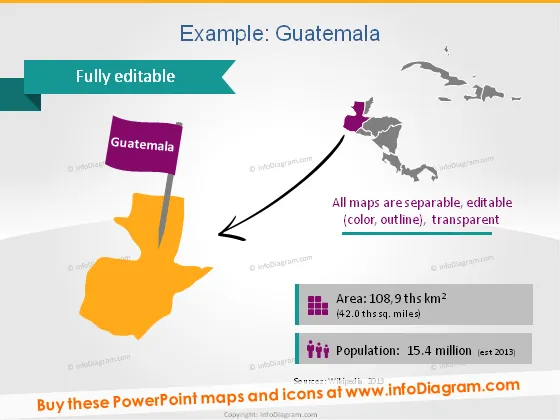
Example: Guatemala
Slide Content
The slide presents geographical and demographic information about Guatemala. A highlighted map of Guatemala indicates its position relative to Central America. Notes on the slide state that all maps are separately editable in terms of color, outline, and transparency. There are two key statistics provided: the area of Guatemala, which is 108.9 thousand square kilometers, and the population, estimated at 15.4 million in 2013. These facts are useful for quickly understanding the country's size and populace.
Graphical Look
- The slide features a large title at the top in bold, dark font against a light background for contrast.
- A large, colored map of Guatemala is center stage, with a 3D effect, in bright yellow-orange, drawing the eye.
- A purple flag icon labeled "Guatemala" is pinned to the map, adding a visual element of location identification.
- An arrow points from the Guatemala map to a simplified, gray outline of Central America, situating Guatemala geographically.
- Two infographics are positioned at the bottom, a stack of bars representing area, and a demographic icon for population.
- The colors of the infographics, including shades of green and purple, complement the map colors.
The slide is visually engaging with a mix of bright and muted colors and uses icons and graphics effectively to represent data. The overall look is professional and suitable for an informative presentation.
Use Cases
- Utilized in educational settings to teach students about the geography and demographics of Guatemala.
- Employed in business presentations to discuss market opportunities or demographic insights in Guatemala.
- Used during international conferences or meetings to provide a visual summary of country-specific information.
- Included in tourism industry presentations to highlight travel destinations and relevant statistical data.
How to Edit
How to edit text & colors

How to expand / shorten diagram

How to Replace Icons in infoDiagram PPT


