
Reviews
Vos graphiques ajoutent une belle touche à mes présentations et je les ai récemment utilisés pour l'une de mes réunions générales. Votre boîte à outils ajoute du professionnalisme à mes diapositives. Au lieu d'utiliser des cliparts standards.
J'avais besoin d'un nouveau regard sur certaines de mes diapositives. J'ai essayé de trouver un moyen de créer un effet de pinceau, de souligner, d'accentuer, d'ajouter de la couleur et les marqueurs manuscrits étaient exactement ce qu'il fallait. Très facile à utiliser, facile à ajuster la taille, à changer la couleur. C'était une solution abordable et parfaite et je suis heureux de la recommander.
L'aspect net et épuré des graphiques, et le fait qu'il m'ait permis d'éditer et de changer facilement les couleurs pour les adapter au modèle, ont été les principales raisons de mon achat.
Description
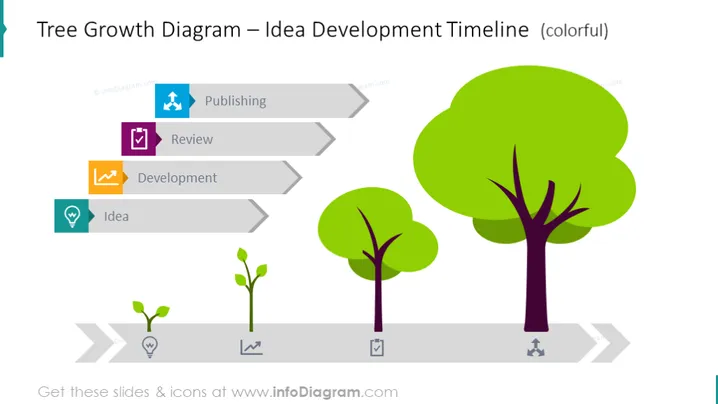
Tree Growth Diagram – Idea Development Timeline
Slide Content:
The slide depicts a metaphorical representation of the development process of an idea through the stages of growth, akin to a growing tree. Starting with the "Idea" stage, symbolized by a small sprout, it progresses to "Development," represented by a slightly larger sapling. The next phase is "Review," where the sapling is now a young tree, followed by "Publishing," depicted by a fully grown, leafy tree. Each stage is connected by arrows, indicating the flow and growth from one phase to the next, illustrating the evolution and maturation of an idea into a final product or publication.
Graphical Look:
- The slide background is plain and light-colored, providing a neutral canvas for the graphic elements.
- A horizontal, grey, arrowed timeline runs across the slide, segmented into four parts to represent different stages.
- Four stylized tree graphics of increasing size from left to right, correlating with the stages of the idea development process.
- Each tree is paired with a colored icon and text box: a light blue bulb for "Idea," an orange gear for - "Development," a purple checkmark for "Review," and a blue document for "Publishing."
- The icons are simple and modern, with a flat design aesthetic.
The overall look of the slide is modern and clean, with a colorful and intuitive design that makes it easy to understand the progression concept. The use of trees as a metaphor for growth and development provides a natural and organic feel to the ideal evolution process.
Use Cases:
- In a business presentation illustrate the stages of product development or project management.
- During a start-up pitch to show potential investors the roadmap from conception to market.
- In educational settings to explain the process of academic research or writing, from initial idea to publication.
- As a visual aid in creative workshops to demonstrate the progression of artistic or design projects.
How to Edit
How to edit text & colors

How to expand / shorten diagram

How to Replace Icons in infoDiagram PPT


