
Reviews
Sus gráficos añaden un toque agradable a mis presentaciones y recientemente los usé para una de mis reuniones generales. Su conjunto de herramientas añade profesionalismo a mis diapositivas. En lugar de usar imágenes prediseñadas estándar.
Necesitaba un aspecto fresco para algunas de mis diapositivas. Había intentado encontrar una forma de crear un efecto de pincel, de subrayar, acentuar, añadir algo de color y los marcadores escritos a mano fueron justo lo que necesitaba. Muy fácil de usar, fácil de ajustar el tamaño, cambiar el color. Fue una solución asequible y perfecta, y estoy feliz de recomendarla.
El aspecto nítido y limpio de los gráficos, y el hecho de que me permitiera editar y cambiar fácilmente los colores para que coincidieran con la plantilla fue mi principal razón para comprarlos.
Description
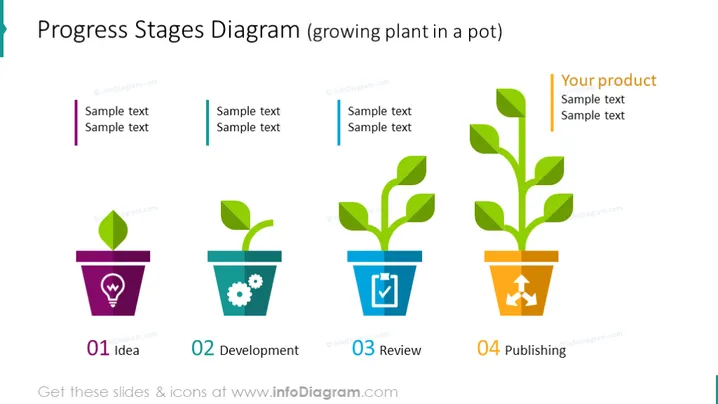
Progress Stages Diagram (growing plant in a pot)
Slide Content:
The slide showcases a four-stage progression diagram using the analogy of a plant's growth to represent the development of a product or idea. Each stage is marked by a numbered pot and includes a plant at different growth stages, symbolizing the evolution of a concept. The stages are: "01 Idea," where the plant is just a sprout, indicating the inception of an idea; "02 Development," with a small leaf, representing the development process; "03 Review," featuring a larger plant with multiple leaves, suggesting scrutiny and refinement; and "04 Publishing," where the plant is fully developed with several leaves, symbolizing the final, ready-to-launch product.
Graphical Look:
- Four colorful pots in purple, teal, blue, and orange, each labeled with a stage number and name.
- Above each pot is a green plant, with the size and number of leaves increasing from left to right.
- Each pot has a unique icon: a lightbulb for "Idea," gears for "Development," a checkmark for "Review," and an upward arrow for "Publishing."
The slide is visually engaging with its clear, colorful representation of growth stages. The use of plant imagery effectively conveys the concept of development and progress in a simple, yet creative manner.
Use Cases:
- In project management presentations to outline the phases of project development.
- During marketing meetings to describe the lifecycle of a product launch.
- For educational purposes, to teach about the stages of business or product development.
- In team workshops to track progress and set expectations for the stages of collaborative projects.
How to Edit
How to edit text & colors

How to expand / shorten diagram

How to Replace Icons in infoDiagram PPT


