
Reviews
Sus gráficos añaden un toque agradable a mis presentaciones y recientemente los usé para una de mis reuniones generales. Su conjunto de herramientas añade profesionalismo a mis diapositivas. En lugar de usar imágenes prediseñadas estándar.
Necesitaba un aspecto fresco para algunas de mis diapositivas. Había intentado encontrar una forma de crear un efecto de pincel, de subrayar, acentuar, añadir algo de color y los marcadores escritos a mano fueron justo lo que necesitaba. Muy fácil de usar, fácil de ajustar el tamaño, cambiar el color. Fue una solución asequible y perfecta, y estoy feliz de recomendarla.
El aspecto nítido y limpio de los gráficos, y el hecho de que me permitiera editar y cambiar fácilmente los colores para que coincidieran con la plantilla fue mi principal razón para comprarlos.
Description
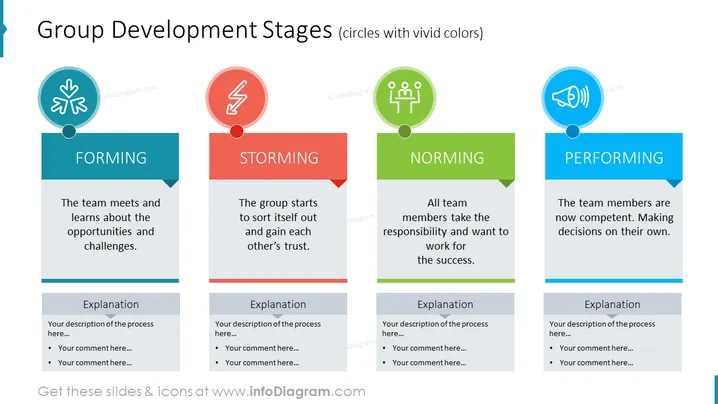
Group Development Stages (circles with vivid colors)
Slide Content
The slide discusses "Group Development Stages" by delineating them into four key phases: Forming, where the team meets and learns about the opportunities and challenges; Storming, where the group starts to sort itself out and gain each other's trust; Norming, signifying all team members take responsibility and work towards success; Performing, when the team members are competent and capable of making their own decisions. Each stage is supported by space for an explanation and additional comments to elaborate further on each development stage.
Graphical Look
- The slide has a clean and modern design with a white background.
- It features four colored circular icons at its top, each representing a different stage of team development with symbols - a handshake, a lightning bolt, a group of people, and a megaphone respectively.
- Beneath each icon, there is a colored banner with the name of the development stage in white capital letters: blue for FORMING, red for STORMING, green for NORMING, and light blue for PERFORMING.
- Each stage has a short descriptive text underneath the banner explaining the phase.
- Below the descriptions are grey text boxes labeled "Explanation" with bullet points for additional notes.
- The icons and banners are visually connected by a thin line that runs through the mid-section of the slide.
The overall look of the slide is visually appealing and well-organized. The use of vivid colors for each stage allows for easy differentiation and focuses attention on each part of the development process.
Use Cases
- Utilized during a team-building workshop to familiarize participants with the stages of group development.
- Incorporated into management training sessions to educate future leaders on team dynamics and development.
- Deployed during project kickoff meetings to set expectations for team progress and challenges.
- Presented in organizational development seminars to illustrate common patterns in team formation and growth.
How to Edit
How to edit text & colors

How to expand / shorten diagram

How to Replace Icons in infoDiagram PPT


